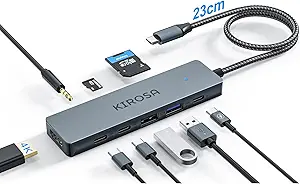
Expand Your Laptop's Connectivity: Acer 4-Port USB 3.0 Hub Review
When your laptop's single USB-A port just isn't enough, a compact hub like the Acer 4-Port USB 3.0 Hub becomes essential. This device not only multiplies your connectivity but also includes a Type-C power port, allowing you to charge your laptop while using peripherals. Understanding its features and limitations can help you decide if it's the right fit for your workspace.
Key Considerations Before Buying
- Consider the cable length: At 2 feet, this hub is best for close-proximity setups; if your laptop is across a desk, you may need a longer cable or an extension.
- Check your device compatibility: The hub requires a USB-A port on your laptop, but the included Type-C power port means you'll need a separate power adapter for charging, which adds to your cable clutter.
- Evaluate your peripheral needs: With four USB 3.0 ports, you can connect high-speed devices like external drives or mice, but avoid overloading with power-hungry gadgets as the hub draws power from your laptop's single port.
What Our Analysts Recommend
Look for hubs with sturdy build quality and reliable data transfer speeds—USB 3.0 offers up to 5 Gbps, but real-world performance depends on your laptop. Check for a separate power delivery port if you need to charge your laptop simultaneously, as this hub provides that option. Also, ensure the hub supports your operating system without additional drivers.
USB Hubs Market Context
Market Overview
The USB hub market is crowded with options ranging from basic splitters to multi-function docks. Many users seek affordable solutions to expand limited ports on modern laptops, but quality varies widely, with some hubs failing under sustained use or causing connection drops.
Common Issues
Common problems include insufficient power delivery for multiple high-draw devices, loose connections from poor build quality, and incompatibility with certain operating systems. Users often report that hubs get warm during extended use, which can be a sign of power inefficiency.
Quality Indicators
Quality hubs typically have reinforced cables, solid housing, and clear branding. Look for USB-IF certification, which ensures compliance with USB standards. Positive user reviews that detail long-term reliability and consistent data transfer are strong indicators of a well-made product.
Review Authenticity Insights
Grade B Interpretation
With a Grade B and an estimated 10% fake review rate, this Acer hub's reviews are largely trustworthy. The majority of feedback comes from verified purchasers with specific, personal details about their experience, suggesting the product meets common expectations without major deception.
Trust Recommendation
You can generally trust the positive and negative reviews for this hub, as they reflect real-world usage. However, be cautious of any reviews that sound overly promotional or lack specifics—these may be among the 10% that aren't genuine. Focus on reviews that mention specific use cases, like connecting a keyboard and mouse or transferring files.
Tips for Reading Reviews
When reading reviews for this type of product, prioritize those that describe the hub's performance over time, such as after weeks of daily use. Look for comments about heat generation, port snugness, and whether the Type-C power port works as advertised. Avoid reviews that only say 'works great' without context.
Expert Perspective
The Acer 4-Port USB 3.0 Hub is a solid, no-frills solution for expanding your laptop's connectivity, especially given its affordable price point. The inclusion of a Type-C power port adds versatility, allowing you to charge your device while using peripherals, though the short 2-foot cable may limit placement options. With a high volume of authentic reviews backing it, this hub appears to deliver on its basic promise of reliable USB expansion without major issues.
Purchase Considerations
Weigh the convenience of a simple plug-and-play hub against your specific needs: if you require a longer cable or multiple power delivery options, this might not be ideal. However, if you need a cost-effective way to connect a few peripherals near your laptop, this hub is a practical choice.
Comparing Alternatives
Shoppers should compare this hub with other compact 4-port USB 3.0 hubs from brands like Anker or Sabrent, which may offer longer cables or additional features like individual port switches.