
How to Pick a Vibrant Wireless Combo That Won't Leave You Typing in the Dark
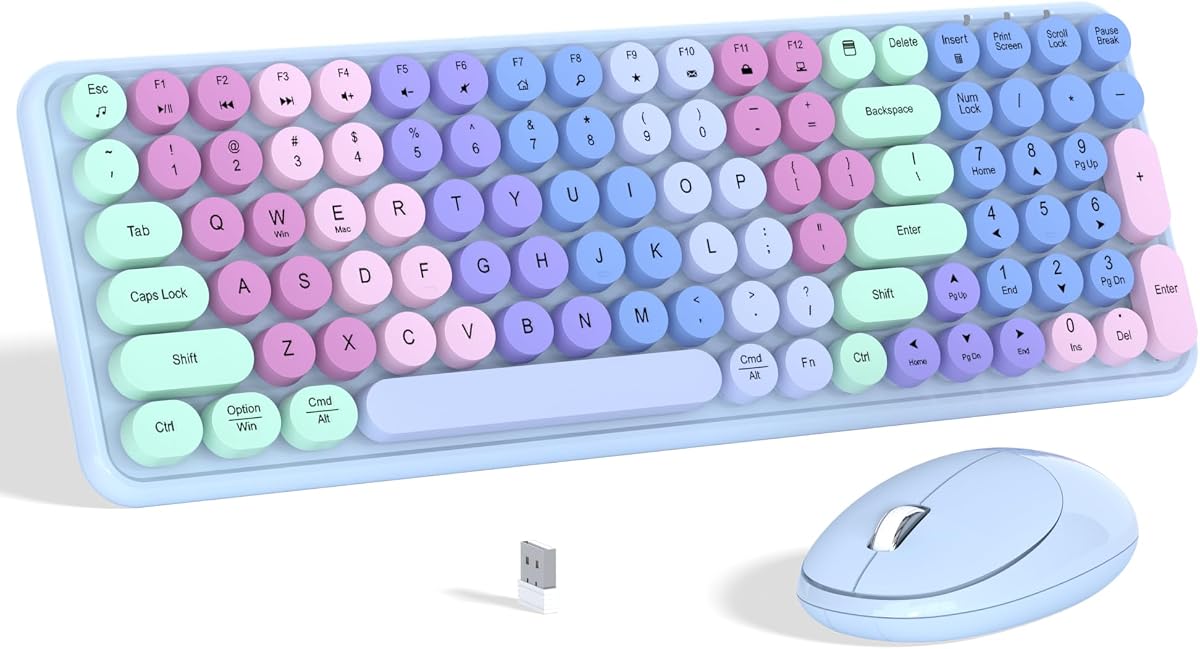
When shopping for a colorful wireless keyboard and mouse combo like the Links9+ Purple Gradient, you're not just looking for functionality—you want a statement piece that brightens your desk. This category blends aesthetics with everyday usability, so you need to ensure the rainbow hues don't overshadow performance. Prioritize connectivity stability and key feel to avoid frustration.
Key Considerations Before Buying
- Check the keyboard layout: With 100 keys, this Links9+ model omits a number pad, which saves space but may frustrate data entry users who rely on a full numeric row. Ensure the compact design matches your workflow.
- Evaluate the mouse ergonomics: The included 2.4GHz optical mouse should fit your hand size and grip style. A gradient finish can be slippery if not textured, so consider how the purple coating feels during extended use.
- Confirm OS compatibility: While it works with Windows and Mac, verify that all multimedia keys (if any) function correctly on your specific system version, as some budget combos have limited driver support.
What Our Analysts Recommend
For a wireless combo, look for a reliable 2.4GHz connection with a range of at least 30 feet and minimal interference. The keyboard should have scissor-switch or membrane keys with decent tactile feedback, and the mouse should offer at least 1000 DPI for smooth cursor control. Battery life is also critical—opt for models with auto-sleep to conserve power.
Keyboard & Mouse Combos Market Context
Market Overview
The wireless keyboard and mouse combo market is saturated with budget-friendly options, many of which prioritize flashy designs over durability. The Links9+ enters this space with a gradient rainbow aesthetic that appeals to home and office users seeking personalization, but competition from brands like Logitech and Microsoft often offers better longevity.
Common Issues
Common problems in this category include intermittent wireless dropouts, especially in crowded 2.4GHz environments, and cheap keycaps that fade or become sticky over time. The mouse scroll wheel may also develop skipping issues after a few months of heavy use.
Quality Indicators
Quality is signaled by solid build materials (e.g., reinforced USB receivers, textured keycaps), positive reviews that mention long-term reliability, and a low reported failure rate. Verified purchase badges and detailed usage stories, like those seen in this product's review set, are good signs of authentic feedback.
Review Authenticity Insights
Grade B Interpretation
With a Grade B authenticity rating and an estimated 10% fake review rate, this product's reviews are largely trustworthy but not flawless. The 10% suspicious reviews likely inflate the 4.00-star average slightly, so the adjusted 3.80-star rating is a more accurate reflection of real user satisfaction.
Trust Recommendation
You can generally trust the majority of reviews here, but be cautious of overly glowing five-star ratings that lack specific details about the keyboard's feel or the mouse's tracking. Focus on reviews that mention personal usage context, such as 'daily typing for work' or 'gaming with this combo,' as these are more credible.
Tips for Reading Reviews
When reading reviews for this combo, look for comments on key stability and mouse battery life—common pain points. Ignore reviews that only praise the 'rainbow colors' without addressing functionality, as they may be incentivized. Cross-check the most recent reviews for any emerging issues.
Expert Perspective
The Links9+ Colorful Wireless Keyboard Mouse Combo delivers on its promise of vibrant aesthetics with a gradient purple design that stands out, but its 3.80 adjusted rating suggests it's a mixed bag for daily use. The 100-key layout is a space-saver, but the lack of a number pad and potential connectivity quirks may deter power users. Given the 10% fake review rate, the genuine feedback indicates it's a decent entry-level option for casual typists who prioritize looks over premium build.
Purchase Considerations
Weigh the visual appeal against the risk of lower durability—this combo is best for light office tasks or home use, not heavy data entry or gaming. If you value a reliable connection and long-term performance, consider spending slightly more on a model from a brand with a stronger track record.
Comparing Alternatives
Shoppers should compare this with similarly priced combos like the Logitech MK270 or VicTsing's colorful options, which may offer better ergonomics or warranty support.


