
Choosing a Mac-Compatible Wireless Mouse: Balancing Portability and Performance
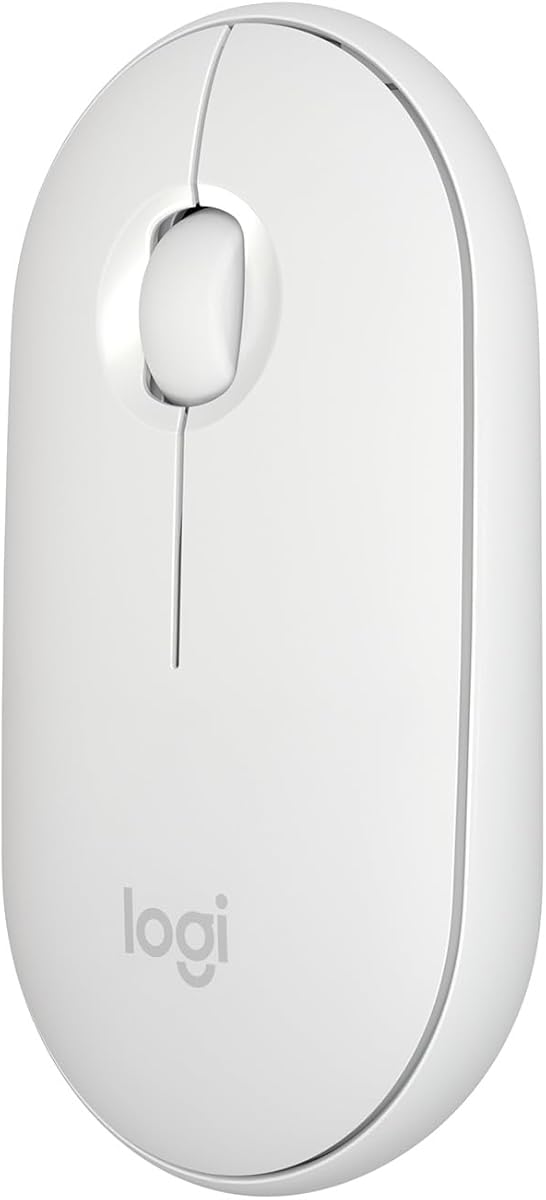
When selecting a wireless mouse specifically designed for Mac users, the Logitech Slim demonstrates how form factor and connectivity impact daily workflow. This ultra-thin Bluetooth mouse prioritizes minimalism and seamless macOS integration, but buyers should understand the trade-offs between its sleek design and ergonomic considerations.
Key Considerations Before Buying
- Bluetooth connectivity versus USB receiver options: This mouse uses Bluetooth 5.0 for direct pairing, eliminating dongle clutter but potentially introducing occasional connectivity hiccups that some users report.
- Battery life versus charging convenience: With up to 10 months on a single AA battery, this mouse avoids frequent charging but lacks the rechargeable convenience of some competitors.
- Mac-specific features: The mouse supports macOS gestures and smooth scrolling optimized for Apple's ecosystem, but lacks programmable buttons common in gaming or productivity-focused mice.
What Our Analysts Recommend
For Mac-specific peripherals, examine software compatibility with macOS versions and gesture support. With slim designs like this Logitech model, check palm support and click feedback—some users find the low profile uncomfortable during extended use despite its aesthetic appeal.
Mice Market Context
Market Overview
The Mac-compatible mouse market has evolved beyond basic pointing devices to include ecosystem-specific features like gesture controls and optimized scrolling. Logitech's MX series dominates the premium segment, while this Slim model targets users prioritizing portability and minimalist aesthetics.
Common Issues
Bluetooth connectivity inconsistencies plague many wireless mice, with interference from other devices causing occasional lag. Slim designs often sacrifice ergonomic support, leading to hand fatigue during prolonged use that bulkier mice avoid.
Quality Indicators
Look for precise tracking on various surfaces (this model handles glass surprisingly well), consistent Bluetooth 5.0+ connectivity, and durable button mechanisms. The Logitech Slim's white finish shows less wear than some matte alternatives, according to long-term reviewers.
Review Authenticity Insights
Grade B Interpretation
A Grade B authenticity rating with 11% estimated fake reviews indicates generally trustworthy feedback, though approximately 1 in 9 reviews may be artificially positive. The 4.60 adjusted rating (down from 4.89) suggests genuine satisfaction sits slightly below the surface impression.
Trust Recommendation
Focus on verified purchase reviews mentioning specific use cases like graphic design or extended coding sessions. The high percentage of verified purchases (noted in analysis) increases confidence, but cross-reference negative reviews about Bluetooth connectivity for balanced perspective.
Tips for Reading Reviews
Prioritize reviews discussing battery life duration with actual usage patterns and connectivity experiences in multi-device environments. Look for mentions of macOS version compatibility, as some users report issues after OS updates.
Expert Perspective
The Logitech Slim Wireless Mouse for Mac delivers exceptional portability and aesthetic harmony with Apple products, earning its strong 4.60 authentic rating. However, the slim profile requires adjustment—users with larger hands or those needing all-day comfort may experience fatigue. Its Bluetooth 5.0 implementation generally performs well, though the absence of a USB receiver option limits troubleshooting alternatives when connectivity issues arise. The white colorway maintains its appearance better than expected, addressing common concerns about light-colored peripherals showing wear.
Purchase Considerations
Consider your daily usage patterns: this mouse excels for mobile professionals and minimalist setups but may disappoint users requiring extensive button customization or palm support. The AA battery system provides reliability but lacks the premium feel of rechargeable solutions. At its price point, evaluate whether macOS optimization justifies potential ergonomic compromises.
Comparing Alternatives
Compare with Logitech's MX Master series for advanced features or Apple's Magic Mouse for deeper ecosystem integration before deciding.



