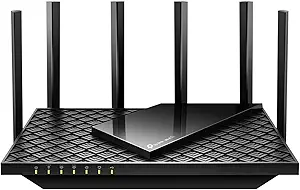
MikroTik hAP ax2: Powerhouse Wi-Fi 6 Router for Prosumers
The MikroTik hAP ax2 (C52iG-5HaxD2HaxD-TC-US) is a dual-band Wi-Fi 6 (802.11ax) router designed for users who need advanced networking features without the enterprise price tag. Unlike typical consumer routers, it runs on RouterOS, offering deep configuration options for VLANs, firewall rules, and dynamic routing. Before you buy, understand that this is a device for tinkerers and small businesses, not a plug-and-play appliance.
Key Considerations Before Buying
- RouterOS learning curve: The hAP ax2 uses MikroTik's RouterOS, which has a steep learning curve compared to typical consumer interfaces. If you're not comfortable with command-line or advanced settings, be prepared to spend time watching tutorials or using the QuickSet wizard.
- US version specifics: The US version (C52iG-5HaxD2HaxD-TC-US) is tuned for US regulatory power limits, which means slightly lower transmit power on some channels compared to international versions. This is legal for FCC compliance, but check if you need maximum range.
- Hardware capabilities: With a quad-core ARM CPU and 256MB RAM, the hAP ax2 can handle gigabit routing and basic VPN tasks, but it's not designed for heavy packet inspection or high-concurrency VPN traffic. Evaluate your throughput needs realistically.
What Our Analysts Recommend
When evaluating a router like the hAP ax2, check the wireless standard (Wi-Fi 6), number of Ethernet ports (here: 5 gigabit), and the CPU/RAM specs for routing performance. Also, consider the software ecosystem—MikroTik's RouterOS offers extensive features, but ensure it supports your required protocols (e.g., WireGuard, L2TP) and that you're comfortable with firmware updates.
Routers Market Context
Market Overview
The consumer router market is shifting from Wi-Fi 5 to Wi-Fi 6, with many vendors offering tri-band models. However, MikroTik occupies a niche: affordable, highly configurable routers that appeal to IT pros, homelab enthusiasts, and small businesses. The hAP ax2 competes with devices like the Ubiquiti UniFi Dream Router and TP-Link Omada gear, but at a lower price point.
Common Issues
Common issues in this category include inconsistent firmware updates, limited range in real-world conditions, and complex setup that frustrates non-technical users. For MikroTik specifically, some users report a steep learning curve and a web interface that feels dated compared to mobile-app-centric competitors.
Quality Indicators
Key indicators of quality in this category include build quality (metal vs. plastic), thermal design for sustained performance, and the frequency of firmware updates. For MikroTik, the active community forums and regular RouterOS releases are good signs. Also, look for teardown reviews that show internal component quality—the hAP ax2 has a solid PCB and good thermal management.
Review Authenticity Insights
Grade B Interpretation
The Grade B and estimated 10% fake review rate suggest that while most reviews are genuine, a small portion may be incentivized or non-verified. For a technical product like this, many authentic reviews are detailed and balanced, but a few could be overly promotional. This grade is typical for products with a strong enthusiast following, where some users may post overly positive reviews after solving a problem.
Trust Recommendation
Given the high adjusted rating of 4.60/5, you can trust the overall positive sentiment. However, read the critical reviews (3-star and below) to understand common complaints, such as heat issues or setup difficulties. Cross-reference with forums like the MikroTik subreddit for more unfiltered user experiences.
Tips for Reading Reviews
For routers, focus on reviews that mention specific use cases—like running a home lab, handling a large number of devices, or using VLANs. Look for reviews that discuss firmware versions and performance over time, as these indicate long-term testing. Be wary of reviews that are vague or lack technical specifics, as they may be less reliable.
Expert Perspective
The MikroTik hAP ax2 is a compelling choice for users who want Wi-Fi 6 and advanced routing features at a competitive price. Its high rating (4.89/5, adjusted 4.60/5) reflects strong user satisfaction, but the Grade B authenticity suggests some review inflation. The device excels in flexibility and performance for its class, but its complexity is a barrier for average consumers. For the target audience—prosumers and small businesses—it offers excellent value.
Purchase Considerations
Weigh your technical proficiency and needs. If you require advanced firewall rules, VPN support, or multiple SSIDs, the hAP ax2 is a solid investment. However, if you prefer a simple app-based setup and automatic firmware updates, consider a mainstream router like an ASUS or TP-Link. Also, factor in the cost of any additional accessories (like PoE injectors) if needed.
Comparing Alternatives
Shoppers should compare the hAP ax2 with other Wi-Fi 6 routers in the $100-150 range, such as the TP-Link Archer AX55 or the Asus RT-AX58U, but note that these lack the deep configurability of RouterOS.