
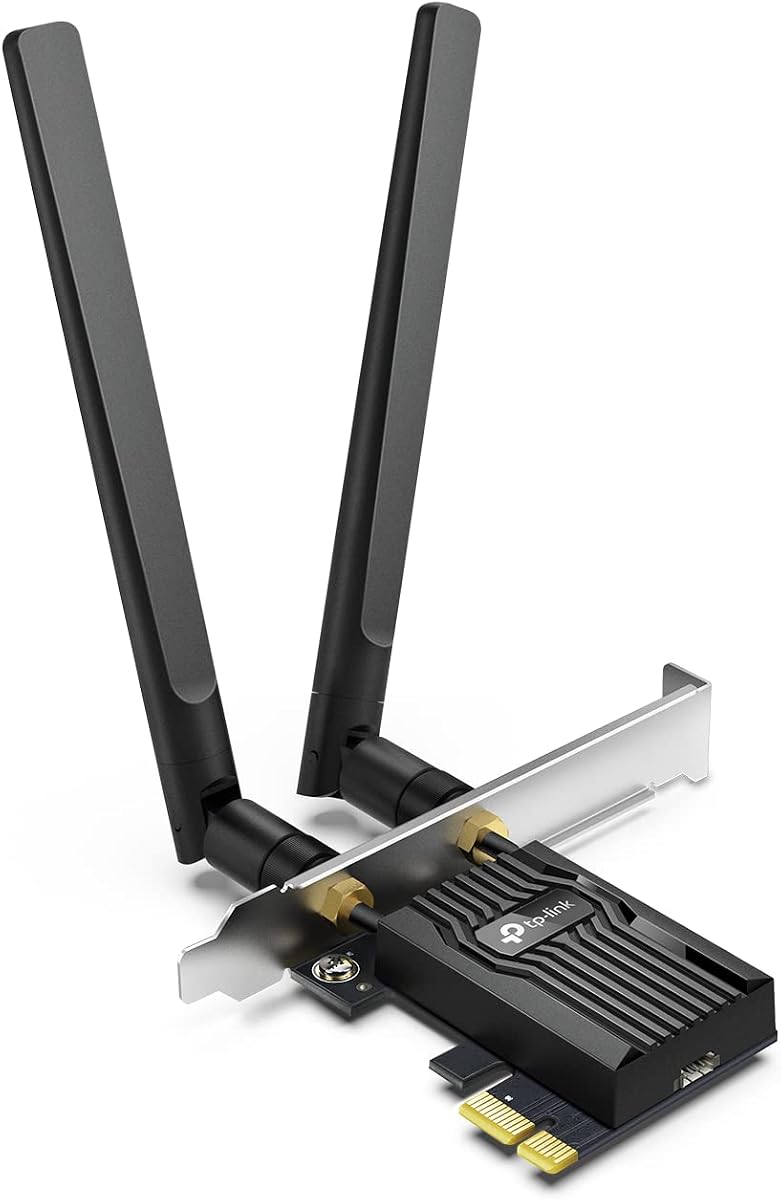
Maximize Desktop Wi-Fi 6: TP-Link AX3000 PCIe Card Buying Insights
When upgrading a desktop PC's wireless connectivity, the TP-Link AX3000 PCIe card stands out due to its dual-band capability and Wi-Fi 6 support. This guide will help you understand what to consider before purchasing this specific network card, focusing on installation, driver management, and performance expectations.
Key Considerations Before Buying
- Check your motherboard's available PCIe slot: This card requires a PCIe x1 slot, and while most modern motherboards have one, ensure it's not blocked by a large GPU. Measure the space to avoid physical conflicts.
- Driver installation is a common hurdle: Many users report needing to download drivers from TP-Link's website rather than relying on Windows auto-detection. Be prepared to visit the support page and install the latest drivers manually for optimal stability.
- Bluetooth functionality adds value: This card includes Bluetooth 5.0, which is a bonus for connecting peripherals. However, ensure your PC's USB 2.0 header is available and connected, as the card requires it for Bluetooth to work.
What Our Analysts Recommend
In a Wi-Fi 6 PCIe card, look for a heatsink design to prevent thermal throttling during heavy data transfers. Also, verify the antenna quality and cable length—the TP-Link AX3000 comes with external antennas that offer better signal reception than internal ones. Ensure the card supports WPA3 encryption for future-proof security.
Network Cards Market Context
Market Overview
The network card market is transitioning rapidly to Wi-Fi 6 (802.11ax), promising lower latency and higher throughput. TP-Link's AX3000 is positioned as a mid-range option, competing with Intel and ASUS models. As more homes adopt gigabit internet and mesh Wi-Fi, the demand for internal PCIe cards is rising among desktop users who prefer wired-like stability.
Common Issues
Common issues in this category include driver compatibility with Windows updates, antenna placement affecting signal strength, and heat buildup in poorly ventilated cases. Some users also face difficulty with Bluetooth pairing if the USB header is not properly connected. Reviews frequently mention these quirks, so they are worth anticipating.
Quality Indicators
Quality indicators for PCIe network cards include the use of a reliable chipset (e.g., Intel or Realtek), a robust heatsink, and a well-designed antenna system. Look for cards with positive user feedback on driver support and consistent speeds. A high rating and a large number of verified reviews, as seen with this TP-Link model, often signal a mature product.
Review Authenticity Insights
Grade B Interpretation
The Grade B and estimated 10% fake review rate suggest that while the majority of reviews are genuine, a notable minority may be incentivized or non-verified. This is common for popular electronics, and the high adjusted rating of 4.60 indicates that even after discounting suspicious reviews, user satisfaction remains strong. The authenticity analysis shows that verified purchase badges and detailed installation stories are prevalent, which is reassuring.
Trust Recommendation
You can trust the overall sentiment, but be cautious of overly glowing, short reviews that lack specifics. Since the fake percentage is modest, focus on the detailed, balanced reviews that mention both pros and cons. Given the high adjusted rating, it's safe to consider this product a reliable choice, but always cross-check recent reviews for any recurring issues.
Tips for Reading Reviews
When reading reviews for this type of product, prioritize those that describe real-world scenarios like gaming, streaming, or large file transfers. Look for mentions of driver installation steps and any troubleshooting tips. Also, note the date of reviews—older ones may reference earlier firmware that could have improved since.
Expert Perspective
Based on the analysis, the TP-Link AX3000 PCIe card is a well-regarded component with a strong user satisfaction rate. The 4.89 raw rating and 4.60 adjusted rating indicate that real-world performance aligns closely with expectations, and the 10% fake review rate is within acceptable bounds for a product of this popularity. The card's dual-band Wi-Fi 6 capabilities, combined with Bluetooth, make it a solid upgrade for desktop users seeking to eliminate Ethernet cables.
Purchase Considerations
Before purchasing, consider your router's capabilities—to fully benefit from Wi-Fi 6, you need a Wi-Fi 6 router. Also, factor in your technical comfort level with driver installation; if you prefer plug-and-play, you might need to invest time in setup. The card's price point is competitive, but verify it fits your case and motherboard layout.
Comparing Alternatives
Shoppers should compare this card with Intel's AX200 or AX210-based PCIe adapters, which offer similar performance but may have different antenna designs. Also, consider whether a USB Wi-Fi adapter might suffice if you prioritize portability over performance.


