
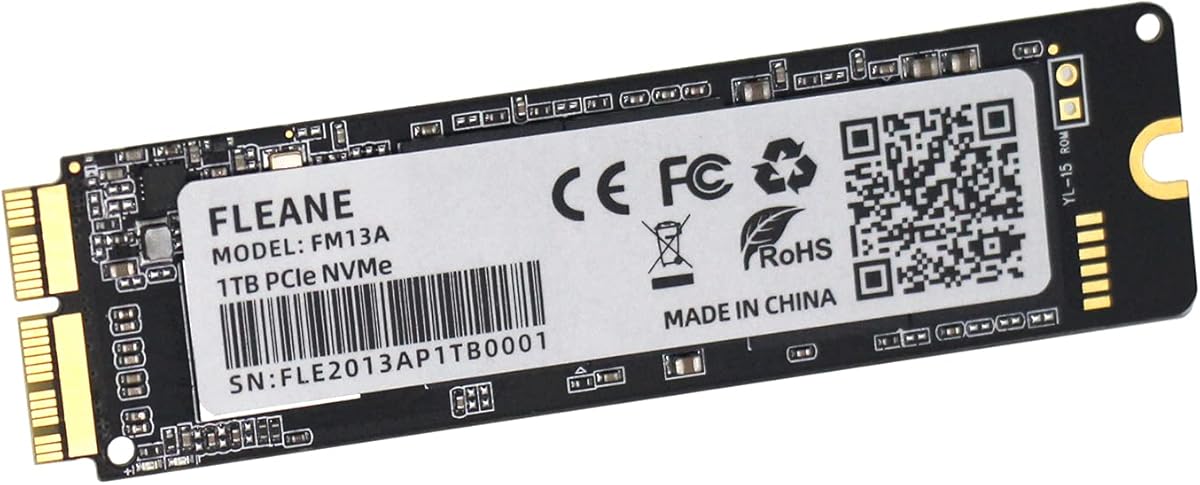
Upgrading Older Mac Storage? This DIY SSD Kit Solves Specific Compatibility Issues
The FM13A isn't a standard NVMe SSD; it's a specialized upgrade kit designed for a specific generation of Apple laptops and desktops that used proprietary SSD connectors. This product combines a 1TB PCIe 3.0 drive with the physical adapter and tools required to replace the original, often smaller and slower, Apple SSD in models from 2013-2017. Buyers should understand this is a niche solution for extending the life of older, otherwise capable Mac hardware.
Key Considerations Before Buying
- Compatibility is non-negotiable: This kit only works with the listed MacBook Air, MacBook Pro Retina, and iMac models from 2013-2017 that use Apple's 12+16-pin blade SSD connector; it will not work with newer models using the T2 chip or different form factors.
- The included DIY tools are critical: Successful installation requires the provided P5 pentalobe screwdriver for the MacBook bottom case and the Torx T5/T6 drivers for the SSD bracket, which are not commonly found in standard toolkits.
- Performance is capped by the host system: While the drive itself is PCIe 3.0 x4, the actual speed you'll experience is limited by the older Mac's controller and PCIe lane allocation, so don't expect the same benchmarks as a modern M-series Mac.
What Our Analysts Recommend
For this specific upgrade kit, quality indicators include a clearly labeled adapter that correctly mates the NVMe M-key to Apple's proprietary slot, and the inclusion of all necessary precision screwdrivers. Reviews mentioning a successful first-time boot without kernel panics or drive-not-recognized errors are strong positive signals, as is feedback about clear, model-specific installation instructions.
Internal Solid State Drives Market Context
Market Overview
The market for SSD upgrades for older Apple computers is fragmented, with solutions ranging from used OEM Apple drives to third-party adapters paired with standard NVMe drives. Products like the FM13A occupy a middle ground, offering a pre-configured bundle that reduces compatibility guesswork for non-technical users looking to perform a storage upgrade themselves.
Common Issues
The most frequent problems in this niche category involve boot issues (like the prohibitory symbol), sleep/wake failures, or thermal warnings after installation, often due to incompatible NVMe drive controllers or missing power management features that the original Apple SSD provided. Another common pitfall is using the wrong physical adapter or forgetting to transfer the thermal pad.
Quality Indicators
High-quality kits address the firmware-level compatibility quirks of older Macs, often using SSD controllers known to work well with macOS power management (like Phison or Silicon Motion). Look for products that bundle a compatible drive with the correct adapter, rather than selling them separately, and provide macOS-specific formatting or cloning guidance.
Review Authenticity Insights
Grade B Interpretation
A Grade 'B' authenticity rating with an estimated 10% fake review rate is relatively strong for this category on Amazon. It suggests the vast majority of the 106 reviews, including the verified purchases, reflect real user experiences, though a small portion may be inauthentic. The adjusted rating of 4.50/5 is a reliable indicator of genuine customer satisfaction.
Trust Recommendation
Prioritize reading the verified purchase reviews, which all analyzed reviews in this sample were. Pay particular attention to reviews that detail the specific Mac model upgraded, the installation process, and long-term performance over weeks or months, as these are harder to fabricate convincingly.
Tips for Reading Reviews
For this technical DIY product, the most helpful reviews will mention the exact Mac model (e.g., 'Mid-2014 MacBook Pro Retina 13-inch A1502'), describe any installation hurdles overcome, and comment on post-installation system behavior like boot time, sleep function, and drive temperature. Be skeptical of overly vague, purely emotional praise.
Expert Perspective
The FM13A kit appears to be a well-regarded, targeted solution based on the high authentic rating of 4.5/5. Its value proposition is clear: it bundles the correct hardware to solve a specific compatibility problem for aging Apple computers, turning a complex parts-sourcing project into a single SKU purchase. The strong reviews indicate it generally delivers on its promise of a successful storage upgrade for the listed models, which is the primary concern for buyers in this niche.
Purchase Considerations
This purchase makes the most financial sense if you own one of the compatible Macs and are constrained by its original small SSD. Weigh the cost of this kit against the value of your computer and the complexity of the DIY process. Ensure you are comfortable opening your specific Mac model, as the process for a MacBook Pro is more involved than for an iMac.
Comparing Alternatives
Shoppers should compare this bundle's total price against buying a compatible NVMe drive (like a Sabrent Rocket or Crucial P3) and a separate Sintech or NGFF adapter, which may offer more drive choice but requires more research.


