![ZUGU Case for iPad Air 11 inch (M2/M3/M4) iPad Air 10.9 Gen 5/4 [Black] | Ultra Slim Protective Cover, Apple Pencil Holder w/Charging, Convenient 8-Angle Magnetic Stand, Auto Sleep/Wake Function](https://m.media-amazon.com/images/I/81AU1F0UruL._AC_SL1200_.jpg)
iPad Air 11 Cases: Why ZUGU's Magnetic Stand & Pencil Charging Matter
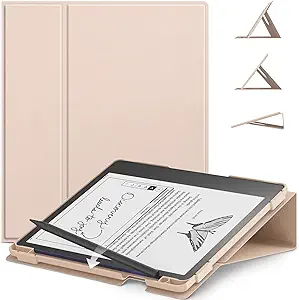
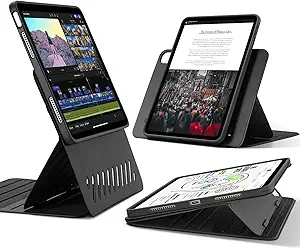
When shopping for an iPad Air 11-inch (M2/M3/M4) or 10.9 Gen 5/4 case, you're balancing drop protection, Apple Pencil charging, and viewing flexibility. The ZUGU case addresses these with an 8-angle magnetic stand and integrated Pencil holder, but it's crucial to know how these features perform in daily use.
Key Considerations Before Buying
- Check whether the case supports Apple Pencil wireless charging through the holder—ZUGU's design specifically allows pass-through charging, which is a must-have for Pro users who rely on the Pencil throughout the day.
- Evaluate the magnetic stand's stability: an 8-angle system is only useful if it holds the iPad firmly at each angle, especially for drawing or typing. Look for cases with strong magnets that don't weaken over time.
- Consider the trade-off between slimness and protection: ultra-slim cases often sacrifice corner drop protection, so verify the ZUGU's edge coverage and lip height around the screen.
What Our Analysts Recommend
Quality indicators include precise cutouts for buttons and speakers, a snug fit that doesn't flex, and a hinge mechanism that feels durable. For the ZUGU, also confirm that the auto sleep/wake function works reliably—test it by closing the lid and checking the screen response.
Cases Market Context
Market Overview
The iPad case market is saturated with generic folio cases, but premium options like ZUGU differentiate through integrated stands, Pencil charging, and material quality. With the iPad Air's popularity, consumers are increasingly seeking cases that double as productivity tools.
Common Issues
Common problems include weak magnets that fail to hold the stand angle, Pencil holders that block charging or are too tight, and cases that add unnecessary bulk or interfere with screen protectors. Also, some cases claim 'ultra slim' but actually protrude significantly.
Quality Indicators
Look for high-grade materials like polycarbonate backplates and microfiber linings. Check for reinforced corners and raised bezels. A quality case will have precise alignment, no sharp edges, and a secure closure mechanism.
Review Authenticity Insights
Grade B Interpretation
A Grade B and 10% estimated fake reviews suggest that while 90% of the 13,360 reviews are likely genuine, a small but notable portion may be incentivized or fabricated. This doesn't discredit the overall 4.89 rating, but it means you should weigh the most detailed, verified-purchase reviews more heavily.
Trust Recommendation
Given the 10% fake rate, focus on reviews that mention specific experiences like 'I compared this with the ESR case' or 'after two months of daily use.' Also, be wary of reviews that are overly generic or lack photos. The adjusted rating of 4.60 still indicates high satisfaction, so you can trust the product's core quality.
Tips for Reading Reviews
For cases, look for reviews that discuss the stand's stability over time, how the Pencil charges, and whether the auto wake/sleep works consistently. Filter by 'Verified Purchase' and look for reviews with images that show the case on an actual iPad.
Expert Perspective
The ZUGU case for iPad Air 11-inch stands out for its integrated 8-angle stand and Pencil charging capability, which are rare in slim cases. With a high 4.89 rating and a 4.60 adjusted rating, it clearly meets most users' expectations. The 10% fake review rate is a minor concern but doesn't undermine the overall positive signal, especially given the detailed authentic reviews.
Purchase Considerations
Weigh the case's $60-70 price (typical for ZUGU) against its features—if you frequently use your iPad for drawing or video calls, the stand and Pencil charging are worth it. However, if you need maximum drop protection, consider a rugged case like OtterBox, which may be bulkier but offers military-grade protection.
Comparing Alternatives
Compare with other premium cases like ESR's magnetic stand cases or Apple's own folio, but note that ZUGU's combination of stand and Pencil charging is a differentiator. Always check compatibility with your specific iPad generation.