Maximize Desk Space: The Ultimate Guide to Free-Standing Monitor Stands
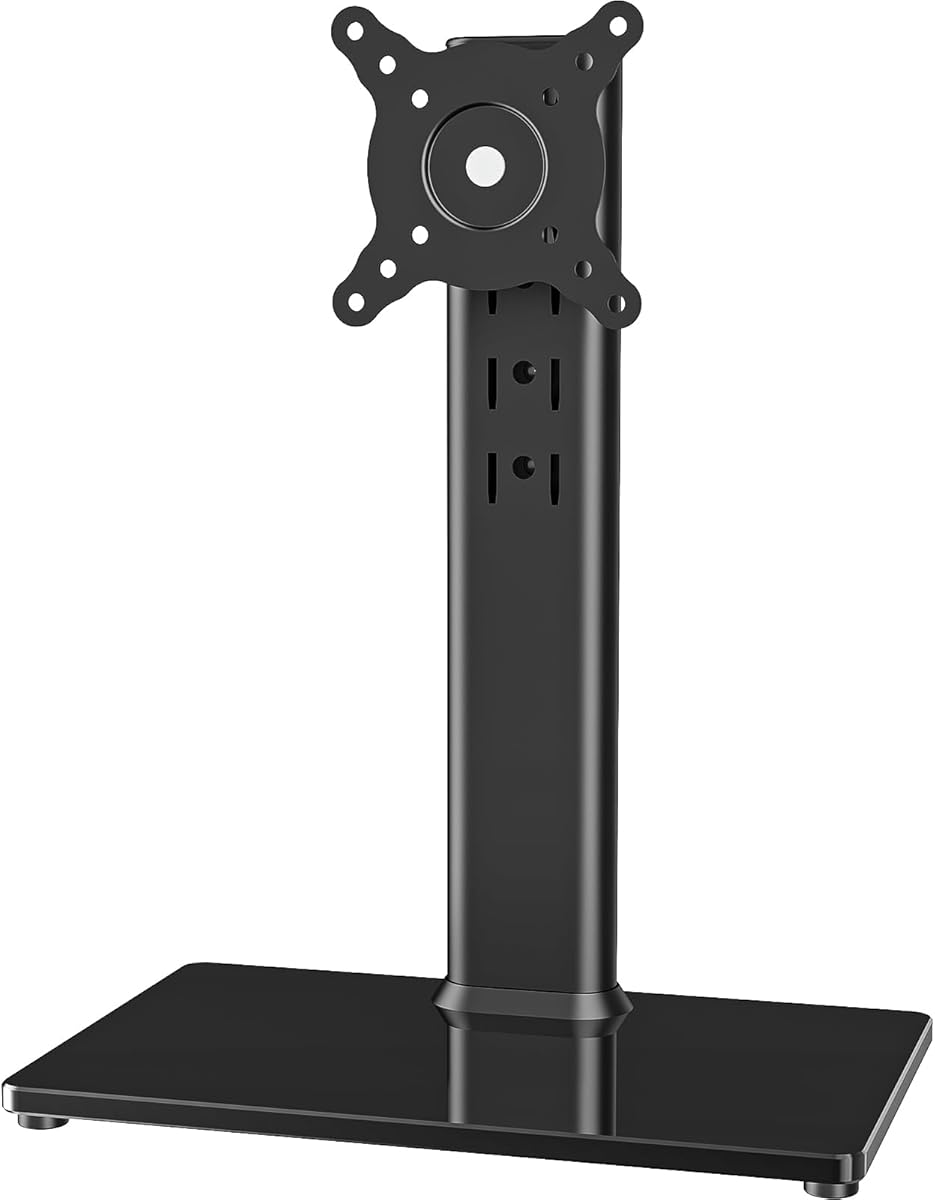
When your monitor's factory stand just isn't cutting it—whether due to limited adjustability or a wobbly base—a free-standing monitor riser like the HT05B-001 offers a robust solution. This guide will walk you through the key factors to consider when choosing a stand for screens between 13 and 32 inches, focusing on weight capacity, ergonomics, and desk compatibility.
Key Considerations Before Buying
- Weight capacity is non-negotiable: The HT05B-001 supports up to 77 lbs, which is generous, but always verify your monitor's weight (including any mounting adapter) to ensure a safe margin. Heavier monitors require sturdier bases to prevent tipping.
- Height adjustability and swivel are crucial for ergonomic comfort: Look for a stand that allows you to position the screen at eye level and rotate it for landscape or portrait orientation. The HT05B-001's swivel and rotation features are designed to reduce neck and eye strain, but confirm the range of motion suits your workspace.
- Footprint and desk space matter: Free-standing stands replace the original base, but they still occupy desk real estate. Measure your desk depth and the stand's base dimensions to ensure it fits alongside your keyboard and other peripherals without crowding.
What Our Analysts Recommend
Beyond weight capacity, inspect the build quality: a heavy-duty steel or aluminum construction with a non-slip base indicates durability. Check the VESA compatibility (75x75mm or 100x100mm) to ensure a secure fit, and look for cable management features to keep your setup tidy. A stand with a smooth height adjustment mechanism—not just a fixed pole—offers better long-term usability.
Monitor Stands Market Context
Market Overview
The monitor stand market has evolved from simple risers to sophisticated ergonomic solutions, driven by the rise of home offices and the need for customizable setups. Free-standing stands like the HT05B-001 are popular because they offer adjustability without the need for clamping to a desk, making them versatile for various desk types.
Common Issues
A frequent problem with budget stands is instability—monitors may wobble or tip, especially if the base is too light or the height is maxed out. Another issue is poor VESA compatibility or flimsy plastic components that wear out quickly, leading to sagging or difficulty in maintaining position.
Quality Indicators
High-quality stands feature a solid metal base with rubber padding to protect your desk and prevent sliding. Smooth gas-spring or gas-assisted height adjustment, precise tilt/swivel mechanisms, and a high weight rating (as seen with the HT05B-001's 77 lbs) are signs of a premium product. Look for brand reputation and warranty as additional confidence factors.
Review Authenticity Insights
Grade B Interpretation
The Grade B rating and 10% estimated fake reviews indicate that the majority of the 9049 reviews are likely genuine, but there's a notable minority that may be incentivized or non-authentic. This means the 4.89/5 rating is probably slightly inflated, with the adjusted 4.60/5 being a more realistic expectation of user satisfaction.
Trust Recommendation
Given the relatively low fake review percentage, you can trust the overall positive sentiment. However, pay closer attention to verified purchase reviews and those that discuss specific pros and cons over time. Be wary of overly enthusiastic reviews that lack detail, as they may be less reliable.
Tips for Reading Reviews
When reading reviews for this stand, focus on comments about long-term durability, ease of assembly, and how well it handles heavier monitors. Look for photos or videos from users showing their setup, as these provide visual proof of the stand's performance. Also, note any recurring complaints about wobbling or adjustability issues—these are more telling than one-off praises.
Expert Perspective
The HT05B-001 appears to be a solid choice for users seeking a robust, free-standing monitor stand, backed by a strong user rating and a high weight capacity that accommodates most 13-32 inch screens. The adjusted rating and authenticity grade suggest that while there is some review inflation, the product generally meets expectations. Its versatility in height, swivel, and rotation makes it a valuable addition to any ergonomic workspace.
Purchase Considerations
Before buying, confirm your monitor's VESA pattern and weight to ensure compatibility. If you have a particularly deep desk or heavy monitor, double-check that the stand's base will provide adequate stability. Consider whether you need the full height range or if a simpler, less expensive riser would suffice.
Comparing Alternatives
While this stand is a strong contender, it's wise to compare it with other free-standing stands that offer similar adjustability, such as those from Vivo or Ergotron, to find the best fit for your specific desk and monitor setup.