Choosing a Reliable External Optical Drive for Modern Laptops
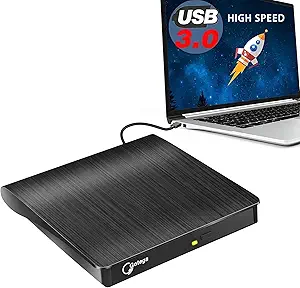
If you're looking to add CD/DVD reading and burning capabilities to a modern laptop or desktop that lacks an internal drive, a portable USB 3.0 model like the Rioddas External CD/DVD Drive is a practical solution. This guide focuses on key factors to ensure compatibility, performance, and durability for tasks like data backup, media playback, or disc duplication.
Key Considerations Before Buying
- Check USB interface compatibility: USB 3.0 offers faster transfer speeds (up to 5 Gbps), which is ideal for burning discs or reading data-heavy discs, but ensure your device has a USB 3.0 port or that the drive is backward compatible with USB 2.0.
- Confirm operating system support: While many drives claim broad compatibility, verify that the drive works with your specific OS version (e.g., Windows 11, macOS Ventura, or Linux distributions) to avoid driver issues.
- Assess build quality and portability: Look for a slim, lightweight design with a sturdy casing, as frequent travel can stress the drive; the Rioddas model is noted for its compact form factor, making it easy to carry.
What Our Analysts Recommend
For a reliable external optical drive, prioritize models with a USB 3.0 interface for speed, support for both reading and writing CDs and DVDs (including dual-layer DVDs), and broad OS compatibility. Also, consider whether you need a disc duplicator feature—some drives can copy discs directly without a computer, which is useful for quick backups.
Disc Duplicators Market Context
Market Overview
The market for external optical drives has shrunk as laptops and desktops increasingly omit internal drives, but demand remains steady among users who need to access legacy media, install software from discs, or create physical backups. USB 3.0 drives have become the standard, offering sufficient speed for most home and office tasks, while slim designs cater to mobile users.
Common Issues
Common problems include compatibility glitches with certain operating systems (especially macOS after updates), slow burning speeds on USB 2.0 ports, and mechanical failure due to poor build quality. Some users also report noise or vibration during high-speed operation, which can be distracting.
Quality Indicators
Quality indicators include a metal or reinforced plastic casing for durability, a reliable chipset (e.g., from MediaTek or Renesas) for stable performance, and positive reviews that mention consistent disc reading and error-free burns. Look for drives with at least a 1-year warranty and a track record of low defect rates.
Review Authenticity Insights
Grade A Interpretation
The Grade A authenticity rating and estimated 5.00% fake review rate indicate that the vast majority of the over 40,000 reviews are genuine, which is excellent for a product in this category. This low percentage of suspicious reviews suggests that the product's high rating (4.67 out of 5) is largely trustworthy, reflecting real user satisfaction.
Trust Recommendation
Given the high authenticity grade, you can confidently rely on the overall rating and review content for decision-making. However, always cross-check a few recent reviews to spot any emerging issues, such as compatibility changes after OS updates, which may not be captured in older reviews.
Tips for Reading Reviews
When reading reviews for external drives, focus on comments about specific use cases (e.g., ripping CDs, burning DVDs) and OS compatibility. Look for detailed mentions of performance with different disc brands or speeds, as these provide practical insights beyond generic praise.
Expert Perspective
Based on the analysis data, the Rioddas External CD/DVD Drive is a solid choice for users needing a reliable, portable optical drive, backed by a large volume of genuine positive reviews. Its high rating (4.67) and low fake review percentage (5.00%) suggest consistent quality and performance across diverse use cases, from data archiving to media playback. The USB 3.0 interface ensures fast data transfer, and broad OS compatibility makes it versatile for both Windows and Mac users.
Purchase Considerations
Before purchasing, consider whether you need DVD burning capabilities (this drive supports it) or just reading, and ensure your laptop has a USB port available. If you plan to use it frequently for disc duplication, verify that the duplicator feature meets your needs, as some models have limitations on disc types or speeds.
Comparing Alternatives
Shoppers should compare this drive with other top-rated external optical drives, such as those from LG or ASUS, which may offer additional features like M-DISC support or quieter operation, depending on your priorities.