
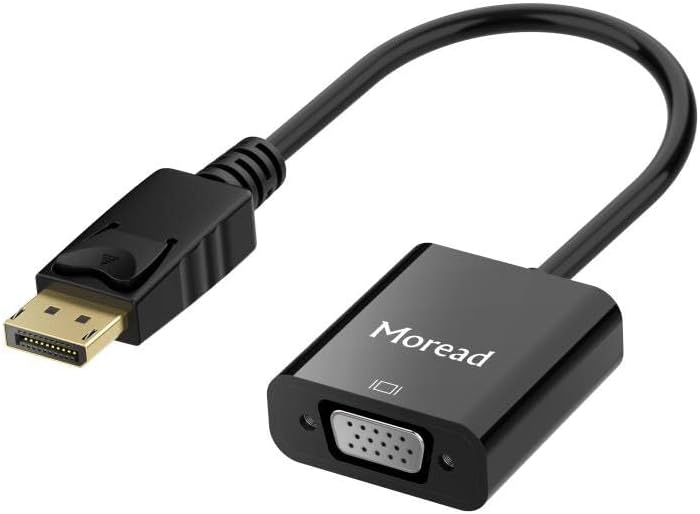
Choosing a DisplayPort to VGA Adapter: What Matters for Signal Conversion
This specific gold-plated male-to-female adapter bridges modern DisplayPort outputs with legacy VGA displays, a common need for office setups and older projectors. Unlike generic adapters, this model's design addresses the active signal conversion required between these fundamentally different digital and analog standards.
Key Considerations Before Buying
- Verify your source device's DisplayPort version; while backward compatible, some laptops with mini-DisplayPort or USB-C/DP Alt Mode require checking physical port compatibility.
- This adapter is 'active,' meaning it contains a chip to convert the digital DP signal to analog VGA, which is non-negotiable for functionality and impacts its compact design.
- Consider your maximum needed resolution; while VGA is legacy, this adapter typically supports up to 1920x1200, but performance can depend on the quality of the internal converter chip.
What Our Analysts Recommend
Gold-plated connectors, like on this model, resist corrosion for a more durable connection. A well-shielded, thick cable section near the adapter head reduces signal interference, a common failure point in cheaper passive adapters that don't work for this conversion.
Computer Cable Adapters Market Context
Market Overview
The DP-to-VGA adapter market is mature but filled with low-quality clones that use inferior converter chips, leading to flickering or no signal. Genuine, reliable active adapters remain in steady demand for business and education environments maintaining older monitors.
Common Issues
The most frequent failures involve adapters that get hot during use (indicating poor chip efficiency) or that fail to sync at certain resolutions. Another common complaint is incompatibility with specific laptop models that have tight power budgets for USB-powered active conversion.
Quality Indicators
Look for mentions of stable performance at 1080p/60Hz in reviews. A solid, non-creaky connector housing suggests better internal construction. Reliable brands often use chips from known manufacturers like MegaChips or Analog Devices, though this is rarely advertised.
Review Authenticity Insights
Grade B Interpretation
A 'B' grade with a 10% estimated fake review rate suggests the vast majority of the 12,226 reviews are trustworthy, but shoppers should be slightly cautious of overly vague 5-star praise. The high number of verified purchases significantly bolsters credibility.
Trust Recommendation
Focus on the detailed 4- and 5-star reviews that mention specific use cases (e.g., 'worked with my Dell laptop and old BenQ projector'). The adjusted 4.60 rating, which accounts for suspicious patterns, is a more reliable performance metric than the raw 4.89 average.
Tips for Reading Reviews
Prioritize reviews that discuss longevity over several months and compatibility with your specific device brand (Lenovo, HP, etc.). Be wary of reviews that only say 'works great' without context, as these may be among the estimated 10% less authentic feedback.
Expert Perspective
The exceptionally high review volume (over 12k) and strong adjusted rating of 4.60 indicate this is a consistently performing adapter in a category plagued by hit-or-miss quality. The male-to-female design offers flexibility, allowing you to use your own VGA cable, which can be advantageous for cable management or length needs. The sustained positive feedback across years suggests the manufacturer has maintained build quality, a critical factor for an active electronic adapter.
Purchase Considerations
This adapter is an ideal solution if you need a reliable bridge to a VGA monitor or projector and value proven reliability over absolute lowest cost. However, if your display has a DVI or HDMI input, a direct DP-to-HDMI adapter would provide a fully digital, often higher-quality connection path.
Comparing Alternatives
Always check if your monitor or projector has a digital input like DVI or HDMI, as a direct digital adapter (DP-to-HDMI) is typically a more future-proof purchase.

![USB C to HDMI Adapter (4K@60Hz), USB Type-C to HDMI Female Adapter [Thunderbolt 3/4 Compatible], Compatible with iPhone 15/15Pro/15ProMax, MacBook Pro, Air, iPad Pro, Pixelbook, XPS, etc](https://m.media-amazon.com/images/I/61-fDKC8l0L.__AC_SX300_SY300_QL70_FMwebp_.jpg)


