
Uni-Directional VGA to HDMI Adapters: Don't Plug It in Backwards
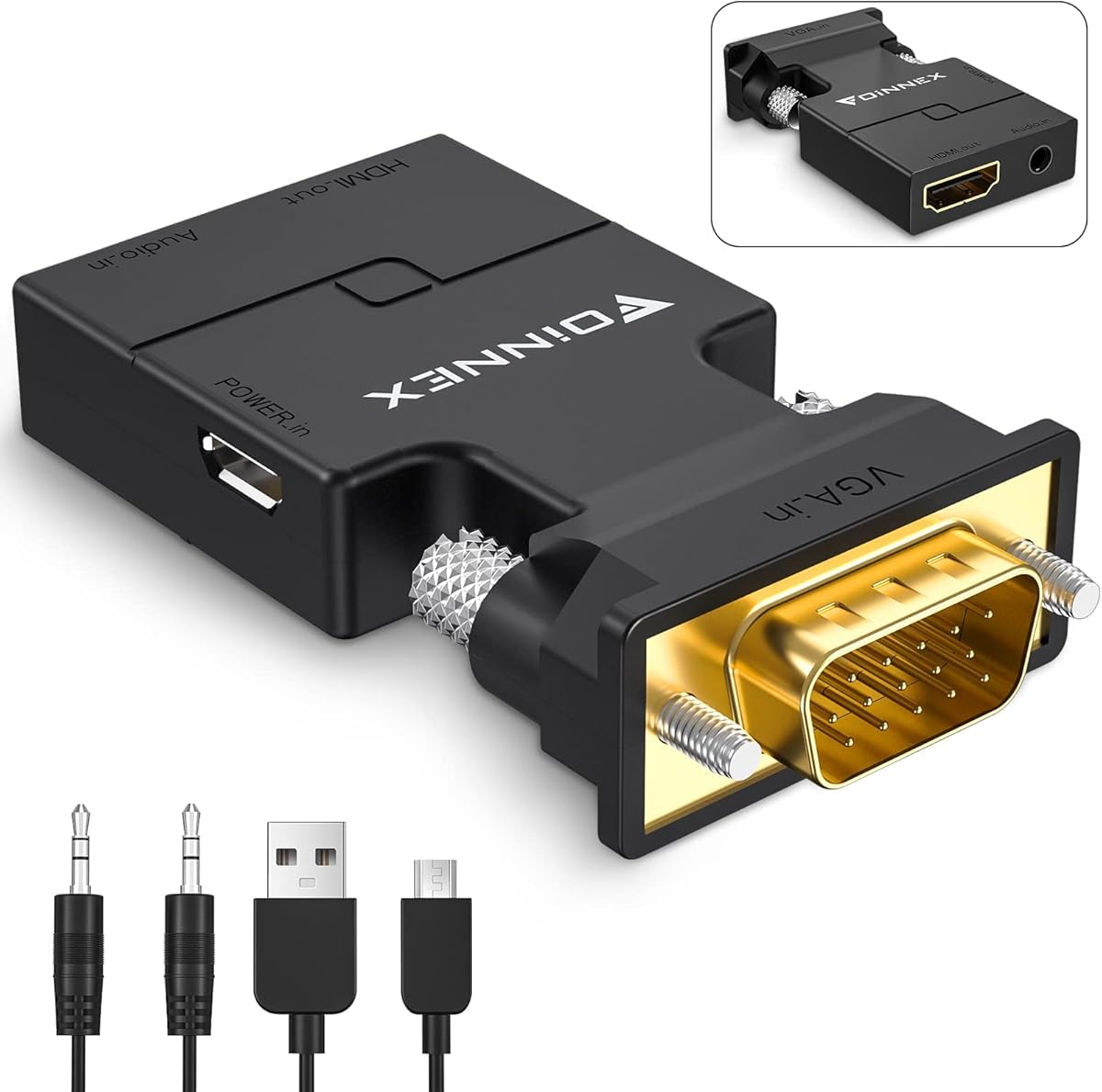
If you're trying to connect an older laptop or projector with a VGA output to a modern HDMI monitor or TV, this active VGA-to-HDMI converter is your bridge. Unlike simple cables, this is a uni-directional device—it only works from a VGA source to an HDMI display, so you must match the ports carefully. It also includes a separate audio cable, which is critical since VGA carries no sound signal.
Key Considerations Before Buying
- Check your source and display ports: This adapter is uni-directional, meaning it converts VGA output (from a laptop, computer, or projector) to HDMI input (on a TV or monitor). Never try to use it in reverse—it won't work and could damage the device.
- Audio is separate: VGA only transmits video, so this adapter includes an additional 3.5mm audio cable. Make sure your source has a headphone jack, or you'll get picture without sound.
- Resolution limits: This adapter supports up to 1080p, which is fine for presentations or older equipment. If you need 4K output from a VGA source, you'll need a different converter with upscaling capabilities.
What Our Analysts Recommend
Quality VGA-to-HDMI adapters should be active converters (not passive cables) to handle the signal conversion properly. Look for models with a sturdy build, a separate audio cable, and clear labeling of the input/output direction. Verified reviews mentioning specific use cases—like connecting a legacy projector to a modern laptop—are a good sign of reliability.
HDMI-to-VGA Adapters Market Context
Market Overview
The market for VGA-to-HDMI adapters remains steady as many businesses and schools still use older projectors and monitors with VGA ports. These active converters fill the gap between legacy equipment and modern HDMI-only displays, but buyers must understand that they are uni-directional and often require an external audio source.
Common Issues
The most frequent complaint is users plugging the adapter in the wrong direction (e.g., HDMI source to VGA display), which won't work and can cause confusion. Another common issue is audio not working because the source lacks a separate audio jack or the cable is not connected properly. Some units also fail to support higher resolutions or refresh rates, leading to flickering or no signal.
Quality Indicators
High-quality adapters will have a compact, durable housing with an integrated chipset for reliable conversion. Look for models that explicitly state they are 'active' and 'uni-directional,' and check for a separate audio input cable. Positive reviews that mention specific device pairings (e.g., 'worked with my Dell laptop and Epson projector') are strong indicators of compatibility and build quality.
Review Authenticity Insights
Grade A Interpretation
With a Review Authenticity Grade of A and only an estimated 5.00% fake reviews, you can be confident that the overwhelming majority of feedback on this product comes from real users. This is a strong signal that the 4.44 average rating reflects genuine satisfaction, not manipulation.
Trust Recommendation
Given the high authenticity grade, you can trust the overall positive sentiment in reviews. However, always focus on reviews that describe specific use cases—like connecting a specific laptop model to a projector—to ensure the adapter will work with your exact setup.
Tips for Reading Reviews
When reading reviews, pay attention to those that mention audio setup and resolution performance, as these are common pain points. Look for verified purchase tags and check for any consistent complaints about the directionality or audio cable length, which can affect usability.
Expert Perspective
This VGA-to-HDMI adapter is a reliable solution for bridging older VGA equipment to modern HDMI displays, especially given its strong authenticity score and high user ratings. The inclusion of a separate audio cable addresses a key limitation of VGA, though it does add a step to the setup. The 1080p resolution cap is adequate for most presentations and legacy content, but not for 4K applications.
Purchase Considerations
Before buying, confirm that your source device has a VGA output and a 3.5mm audio jack, and that your display has an HDMI input. If you need to connect an HDMI source to a VGA display, you'll need a different (and often more expensive) adapter. This product is best for users with one-time or occasional needs, not for permanent installations where a cable might be more convenient.
Comparing Alternatives
Shoppers should compare this with other active VGA-to-HDMI converters that offer different cable lengths, built-in audio, or higher resolution support. For frequent use, consider a dedicated converter box with a power supply for more stable performance.


![Capshi HDMI to VGA Male Adapter 1080P, 6 Feet Cable High Compatibility Video Converter for Laptop, PC, Monitor and Projector[Aluminum Shell, Nylon Braided]](https://m.media-amazon.com/images/I/81hULhwxyWL._AC_SY300_SX300_QL70_FMwebp_.jpg)