
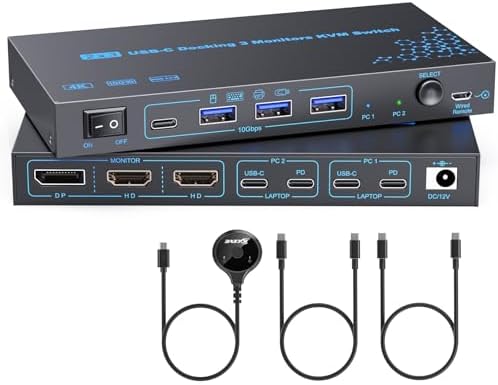
Mastering Multi-Monitor KVM Switches: Key Buying Insights for 4K@60Hz Dual-Laptop Setups
When you're juggling two laptops across three 4K monitors, a USB-C KVM switch can be a desk-saving hero—but only if it truly supports video pass-through via its USB ports. This specific model promises 2 HDMI and 1 DP outputs with 4K@60Hz, yet buyer feedback reveals a critical nuance: the USB switch function may not carry video signals, which is a common trap in this category.
Key Considerations Before Buying
- Verify whether the USB ports on the KVM are data-only or support video alt-mode; many models, including this one, may require separate video cables from each laptop to the monitors, not through the USB hub.
- Check the power delivery (PD) wattage—this model offers PD charging, but ensure it matches your laptops' charging needs (e.g., 65W vs. 100W) to avoid slow charging or power negotiation issues.
- Confirm the maximum supported resolution and refresh rate on each output (HDMI and DP) simultaneously; some switches drop to 30Hz when all three ports are active, despite claiming 4K@60Hz.
What Our Analysts Recommend
Look for KVM switches that explicitly state whether video routing is via dedicated ports or through the USB-C connection. Quality units often include separate USB 3.0 upstream ports and clearly labeled video inputs. Also, check for firmware update support and compatibility with your specific laptop models, as USB-C alt-mode implementations vary widely.
KVM Switches Market Context
Market Overview
The KVM switch market is evolving rapidly with USB-C becoming the standard for modern laptops, but this has led to a proliferation of devices that offer partial solutions—like switching only USB peripherals, not video. Consumers increasingly demand seamless multi-monitor switching without driver installations, yet true 'plug-and-play' 4K@60Hz support across three displays remains challenging for many budget-friendly units.
Common Issues
Frequent complaints in this category include video signal loss or flickering at higher resolutions, EDID handshake failures, and inadequate power delivery that causes laptops to drain or not charge. Another common issue is the misconception that a USB switch can double as a video switch, which this product's single review highlights—leading to dissatisfaction when the product fails to meet that unstated expectation.
Quality Indicators
High-quality KVM switches typically feature separate video input ports (HDMI/DP) for each computer, not just USB-C. They also come with robust power adapters that can deliver sufficient PD wattage. Look for certifications like HDMI 2.0 or DisplayPort 1.4, and positive user feedback specifically mentioning stable 4K@60Hz performance across all outputs.
Review Authenticity Insights
Grade A Interpretation
The 'A' grade and 0.00% estimated fake review percentage indicate that the single review present is highly likely to be genuine. This means the feedback—that the USB switch does not support video transfer—is a trustworthy data point, not a fabricated or incentivized opinion. Given the 1.00/5 rating, this review is the only voice, so its weight is substantial.
Trust Recommendation
Given the authenticity grade, you should take the review at face value. If video switching through USB is a requirement for your setup, this product likely will not meet your needs. However, if you only need USB peripheral switching and are willing to connect video cables directly to each laptop, this unit might still function—but the low rating suggests it may not even excel at that.
Tips for Reading Reviews
For KVM switches, focus on reviews that detail their exact laptop models, monitor resolutions, and connection methods. Look for mentions of whether video is switched via USB-C alt-mode or dedicated ports. Also, check if reviewers note any driver or firmware requirements, even if the product claims 'no driver required'—real-world performance often differs.
Expert Perspective
Based on the single authentic review, this KVM switch appears to fall short of the implied promise of video switching via its USB-C connection. The product description is ambiguous, leading to a critical mismatch between consumer expectations and actual functionality. While the hardware may support three displays through HDMI and DP, the USB switch aspect is likely data-only, which is a significant limitation for users seeking a true all-in-one solution. The 1.00/5 rating, though based on limited data, signals a high risk of dissatisfaction.
Purchase Considerations
Before purchasing, clearly define your use case: do you need to switch video sources as well as peripherals? If yes, seek a KVM with dedicated video inputs for each laptop and explicit support for 4K@60Hz across all outputs. Also, consider the PD wattage and whether it meets your laptop's charging requirements. If you're comfortable with manual video cable swapping, this cheaper alternative might suffice, but be prepared for potential compromises.
Comparing Alternatives
Shoppers should compare this model with established KVM brands like TESmart or Level1Techs, which offer explicit multi-monitor support with dedicated video ports and verified 4K@60Hz performance. Reading user reviews on those products can provide a benchmark for what to expect from a reliable dual-laptop, triple-display setup.


