
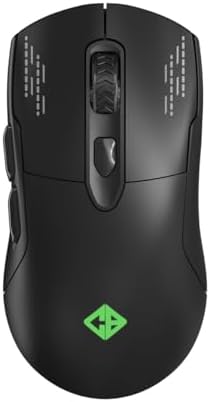
Choosing a Dual-Mode Gaming Mouse: Cosmic Byte Raptor Insights
When shopping for a budget-friendly gaming mouse like the Cosmic Byte Raptor, which offers both wired and wireless modes, you need to balance sensor accuracy, build durability, and ergonomic fit. This guide focuses on key specs such as the Pixart 3212 sensor, DPI range up to 4800, and polling rate of 500Hz to help you decide if it meets your gaming or work needs.
Key Considerations Before Buying
- Consider the sensor type: The Pixart 3212 is an entry-level optical sensor suitable for casual gaming and office tasks, but it may not deliver the precision needed for competitive esports at high speeds.
- Evaluate the polling rate: At 500Hz, this mouse reports position every 2ms, which is adequate for most users, though hardcore gamers might prefer 1000Hz for smoother tracking in fast-paced games.
- Check the switch longevity: With 10 million clicks rated, these switches are durable for moderate use but may wear out faster than higher-end models with 50 million+ ratings if you game heavily daily.
What Our Analysts Recommend
Look for a mouse with a braided cable for durability, as seen here, and PTFE feet for smooth gliding on various surfaces. Ensure the dual-mode connectivity (wired and wireless) is stable and latency-free, and that RGB effects are customizable to your setup.
Gaming Mice Market Context
Market Overview
The Indian gaming peripherals market is booming with affordable options from brands like Cosmic Byte, targeting entry-level and mid-range users. These mice often feature dual-mode connectivity and RGB lighting to compete with premium brands at lower price points.
Common Issues
Common problems in this category include sensor tracking inconsistency at high DPI, wireless connectivity drops, and software customization limitations. Budget mice may also have less durable switches and lower-quality cables over time.
Quality Indicators
Quality indicators include a reputable sensor like Pixart, a high polling rate (1000Hz is ideal), reinforced braided cables, and PTFE feet for reduced friction. Verified reviews with specific usage details, like those seen for the Raptor, also signal reliability.
Review Authenticity Insights
Grade B Interpretation
With a Review Authenticity Grade of B and an estimated 10% fake reviews, the Cosmic Byte Raptor has a trustworthy review base but still includes some suspicious entries. This means you can rely on most feedback, but be cautious of overly glowing 5-star reviews lacking details.
Trust Recommendation
Focus on verified purchasers who mention specific aspects like weight (around 100g), build quality, and dual-mode performance. Reviews from users who compare it to other budget mice, such as those from Zebronics or Redgear, are particularly valuable.
Tips for Reading Reviews
When reading reviews for gaming mice, look for comments on sensor accuracy during fast movements, battery life in wireless mode, and software ease of use. Ignore reviews that only praise aesthetics without discussing actual performance.
Expert Perspective
The Cosmic Byte Raptor offers solid value for its price, with a Pixart 3212 sensor that handles casual gaming and daily use well, though it's not for competitive play. The 500Hz polling rate and 10 million switches are adequate for most users, and the PTFE feet and braided cable enhance durability. Its dual-mode capability adds flexibility, but the 4800 DPI cap and lack of higher-end features may limit enthusiast appeal.
Purchase Considerations
If you're a casual gamer or need a reliable office mouse with RGB flair, this is a strong contender. However, if you play fast-paced shooters or require precise tracking, consider investing in a mouse with a Pixart 3360 sensor and 1000Hz polling rate.
Comparing Alternatives
Shoppers should compare the Raptor with similar-priced mice like the Redragon M711 or Logitech G102 for sensor performance and build quality before finalizing.


