
Maximize Your Laptop Ports: A Guide to the Portronics Mport 31 Pro
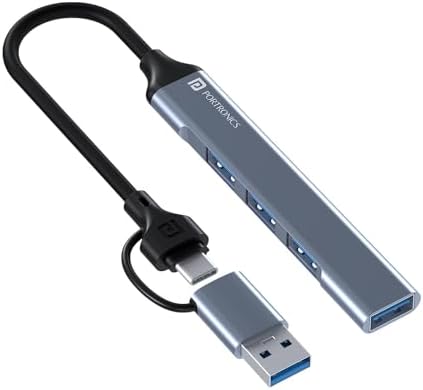
If your laptop has limited ports, a USB hub like the Portronics Mport 31 Pro can be a game-changer. This 4-in-1 hub combines a USB 3.0 SuperSpeed port with three USB 2.0 ports, offering both high-speed data transfer and legacy device support. Its dual Type-C and USB-A plugs ensure compatibility with modern and older laptops, but understanding its specific features helps you decide if it fits your workflow.
Key Considerations Before Buying
- Speed vs. compatibility: The Mport 31 Pro includes one USB 3.0 port (up to 5 Gbps) for fast file transfers, ideal for external SSDs or flash drives. The three USB 2.0 ports (480 Mbps) are best for peripherals like mice or keyboards, not large data transfers.
- Dual plug design: The hub comes with both a Type-C and a standard USB-A connector, offering flexibility for newer laptops (e.g., MacBooks) and older models. However, note that the Type-C plug is not reversible for data—it's a dedicated input, so ensure your device has a compatible port.
- Build and heat management: The aluminum alloy body provides durability and helps dissipate heat, which is important when using multiple high-power devices. This metal construction is a step up from plastic hubs, reducing the risk of overheating during extended use.
What Our Analysts Recommend
When evaluating a USB hub, check the number of USB 3.0 ports (more means faster speeds for multiple devices) and the build material—metal hubs offer better heat dissipation and longevity. Also, verify that the hub supports your laptop's port type (e.g., USB-A or USB-C) and that the cable length is sufficient for your desk setup.
USB Hubs Market Context
Market Overview
The USB hub market in India is crowded with options ranging from budget plastic models to premium metal docks. Many users seek hubs that balance speed, port count, and portability, especially as thin laptops like ultrabooks and MacBooks eliminate traditional USB-A ports. The Portronics Mport 31 Pro targets this mid-range segment with a mix of legacy and modern connectivity.
Common Issues
Common problems with USB hubs include data transfer slowdowns when multiple devices are connected, especially if the hub is USB 2.0-based. Some users report that hubs with aluminum bodies can get warm to the touch, though this is usually normal. Another issue is compatibility with power-hungry devices—some hubs struggle to deliver consistent power without external power adapters.
Quality Indicators
Look for hubs with at least one USB 3.0 port for fast transfers, a sturdy metal casing to prevent overheating, and a short but flexible cable to minimize desk clutter. Verified reviews mentioning consistent performance over months are a strong sign of reliability, while frequent complaints about port failure or heat buildup should raise red flags.
Review Authenticity Insights
Grade B Interpretation
With an authenticity grade of B and an estimated 15.00% fake reviews, this product has a moderate level of review manipulation. While most reviews are genuine, about 1 in 7 may be unreliable—often overly positive or negative. This aligns with typical patterns for mid-range electronics on Amazon India, where fake reviews are common but not overwhelming.
Trust Recommendation
You can generally trust the majority of reviews, but focus on verified purchase reviews with detailed usage descriptions. Look for reviews that mention specific scenarios (e.g., using the hub with a specific laptop model or multiple USB devices) as these are harder to fake. Be cautious of reviews that are extremely brief or lack specifics about the product's performance.
Tips for Reading Reviews
For USB hubs, prioritize reviews that discuss heat management, data transfer speeds, and compatibility with your laptop's operating system. Ignore reviews that only praise the product without mentioning any drawbacks—these are often incentivized. Also, check the date of reviews: newer ones may reflect updated manufacturing quality.
Expert Perspective
The Portronics Mport 31 Pro offers a solid balance of speed and versatility for users who need to connect both USB 3.0 and USB 2.0 devices. Its aluminum body is a premium touch at this price point, and the dual-plug design adds flexibility. However, the 4.00/5 rating (adjusted to 3.70/5) suggests some users experience issues with port durability or inconsistent speeds, so it's not a flawless choice.
Purchase Considerations
If you primarily use USB 3.0 devices (e.g., external SSDs), this hub's single fast port may be a limitation—consider a hub with multiple USB 3.0 ports. For users with a mix of peripherals and a need for a compact, durable hub, the Mport 31 Pro is a reasonable buy, especially if you can find it on sale. Its 15% fake review rate means you should cross-check with independent reviews.
Comparing Alternatives
Shoppers should compare this hub with models like the Anker 4-Port USB 3.0 Hub or the TP-Link UH720, which offer more USB 3.0 ports but may lack the dual-plug design. For laptop users with only USB-C ports, a dedicated USB-C hub might be a better fit.


