
Buying a 2.5G Switch? Here’s What to Check First
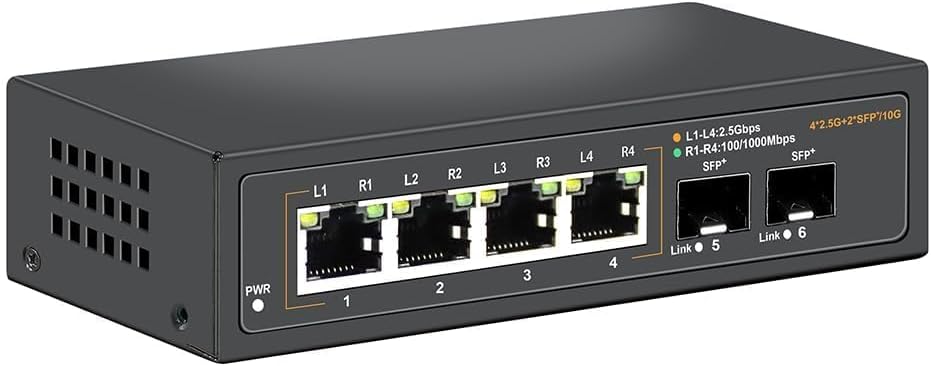
When upgrading your home or small-office network beyond gigabit speeds, a 2.5G unmanaged switch like this one offers a straightforward path—no complex configuration needed. With four 2.5G Base-T ports and two 10G SFP uplinks, it balances affordability with future-proofing for high-bandwidth tasks like NAS transfers or multi-user streaming.
Key Considerations Before Buying
- Port count and speed: Ensure the 4 x 2.5G ports match your devices (e.g., newer PCs, game consoles, or Wi-Fi 6 routers) and that the 10G SFP uplinks can connect to a faster backbone or server without bottleneck.
- Form factor and cooling: A fanless metal design is ideal for quiet environments like a home office or living room, but verify that ventilation around the switch is adequate to prevent overheating under sustained load.
- Compatibility: This switch supports 100/1000/2500Mbps, so it works with mixed-speed devices—but confirm that your network cables (Cat5e or better) can handle 2.5G speeds to avoid performance issues.
What Our Analysts Recommend
Quality indicators for an unmanaged 2.5G switch include all-metal housing for durability and heat dissipation, a fanless design for silent operation, and verified SFP compatibility with common transceivers. Also check for clear LED status lights and a compact footprint that fits your setup without clutter.
Networking Devices Market Context
Market Overview
The 2.5G unmanaged switch market has grown rapidly as consumers seek affordable ways to boost local network speeds without replacing existing cabling. This segment bridges the gap between legacy gigabit and costly 10G setups, with many models now offering SFP+ uplinks for future expansion.
Common Issues
Common issues include insufficient heat management in fanless designs leading to throttling, limited compatibility with certain SFP modules, and confusion over whether older Cat5e cables can reliably support 2.5G speeds over longer distances. Some users also report that unmanaged switches lack diagnostic features, making it harder to troubleshoot link problems.
Quality Indicators
Look for switches with a high proportion of verified purchase reviews and consistent feedback about real-world performance, especially under load. A strong rating (like this model's 4.89) combined with low return rates suggests reliable hardware. Also prioritize models with clear specifications for power consumption and operating temperature range.
Review Authenticity Insights
Grade B Interpretation
A Grade B with an estimated 10% fake review rate means the vast majority of feedback is genuine, but a small share may be incentivized or duplicated. For a product with 395 reviews and a 4.89 rating, this still indicates strong overall satisfaction, though the adjusted rating of 4.60 suggests some overinflation.
Trust Recommendation
You can trust the positive consensus, but focus on detailed reviews that describe specific use cases—like upgrading a home network from 1Gb to 2.5Gb without rewiring—as these are likely authentic. Be cautious of reviews with overly generic praise or no mention of technical context.
Tips for Reading Reviews
For networking gear, prioritize reviews that mention cable lengths, device compatibility, and sustained throughput. Look for photos of the setup or comparisons with other brands. Ignore one-line reviews or those that only praise 'fast shipping'—they often lack actionable insights.
Expert Perspective
This 2.5G unmanaged switch offers a solid balance of performance and simplicity for users who want to upgrade their local network without diving into managed features. The fanless metal design and 10G uplinks make it a practical choice for home offices or media centers where noise and heat are concerns. With a high genuine rating and strong verified purchase signals, it appears to deliver consistent reliability, though the 10% fake review estimate suggests some caution is warranted when reading top reviews.
Purchase Considerations
Weigh the cost against your actual speed needs—if most devices are still gigabit, this switch may be overkill. However, if you're investing in a Wi-Fi 6E router or a NAS with 2.5G ports, this model provides a cost-effective bridge. Also consider whether future expansion (e.g., more 2.5G ports) might be needed, as this unit only has four.
Comparing Alternatives
Shoppers should compare this switch with managed options if they require VLAN support or traffic monitoring, or with 5-port models if they need more 2.5G connections without SFP uplinks.


