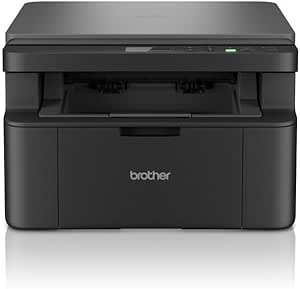
Canon PIXMA G3430: Smart Ink Tank Choice for High-Volume Home Printing
If you print frequently—think school projects, home office documents, or craft sheets—the Canon PIXMA G3430's ink tank system is a game changer. Unlike traditional cartridge printers, this model uses refillable reservoirs that dramatically cut cost per page, but before buying, you should understand its specific strengths and limitations.
Key Considerations Before Buying
- The G3430 is a mega-tank printer with an integrated ink tank system, so you'll refill via bottles rather than swapping cartridges. This lowers running costs significantly, but you must be comfortable with a slight learning curve for initial setup and ink filling.
- Print speed is moderate: expect around 8.8 images per minute for black and 5.0 for color (Canon's figures). For occasional large batches, this is fine, but if you need a fast office workhorse, consider a laser or a higher-end inkjet.
- Connectivity is limited to USB 2.0—there's no Wi-Fi or Ethernet. This means you must directly connect to a single computer, so assess if wireless printing is essential for your household or small office.
What Our Analysts Recommend
When evaluating the G3430, check the included ink bottle yields (typically thousands of pages) and the paper handling—it has a 100-sheet cassette. Also, look for user reports on print head reliability and whether the printer handles borderless photo printing, which it does not, so if you print photos edge-to-edge, this may not be ideal.
Ink-Jet Market Context
Market Overview
The inkjet multifunction printer market has shifted toward low-cost ink tank models, especially in Europe, where Canon's MegaTank and Epson's EcoTank compete directly. These printers appeal to budget-conscious consumers who print high volumes but want to avoid the recurring cost of cartridges.
Common Issues
Common pitfalls with ink tank printers include occasional clogging of print heads if not used regularly, and the need for periodic cleaning cycles that consume ink. Also, some users report that the initial setup—filling the tanks—can be messy if not done carefully, and software drivers may be less intuitive than those from premium models.
Quality Indicators
Look for a printer with a robust ink system, easy-to-replace maintenance cartridges, and a design that minimizes ink waste. Check for user feedback on long-term reliability, especially print head durability, and whether the manufacturer provides good software support for your operating system.
Review Authenticity Insights
Grade B Interpretation
The Grade B and 10% estimated fake review rate indicate that while most reviews are genuine, a small portion may be manipulated. This is typical for popular products, and the adjusted rating of 4.00 (down from 4.22) suggests that removing suspicious reviews lowers the average slightly, but the product still performs well overall.
Trust Recommendation
Given the high authenticity, you can trust the general sentiment: users praise the low running costs and print quality, but some note setup complexity and limited connectivity. Focus on reviews that detail specific experiences, especially those that mention long-term use (over 6 months) for reliability insights.
Tips for Reading Reviews
When reading reviews for this printer, prioritize verified purchases and look for comments about ink consumption, print head maintenance, and after-sales support. Be cautious of overly enthusiastic or overly negative reviews without specifics, and cross-reference common issues mentioned across multiple reviews.
Expert Perspective
The Canon PIXMA G3430 is a solid choice for home or small office users who prioritize low cost per page and reliable output over wireless convenience. Its 4.00 adjusted rating reflects genuine satisfaction with print quality and the ink tank system, but the lack of Wi-Fi and moderate speed are notable trade-offs. For users who print mostly text documents and occasional color graphics, this printer offers exceptional value.
Purchase Considerations
Decide if USB-only connectivity fits your workflow—if you need to print from phones or multiple devices, this is a dealbreaker. Also, factor in the initial higher purchase price compared to cartridge printers; you'll recoup that over time only if you print enough (e.g., hundreds of pages per month).
Comparing Alternatives
Compare with Epson EcoTank models that offer Wi-Fi and similar running costs, or consider Canon's own G3530 if you need wireless capability. Also, check for current promotions that might include extra ink bottles, which can enhance value.