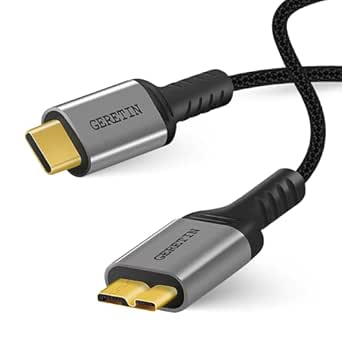
Choose the Right USB-C to Micro USB 3.0 Cable for Fast Data Transfers
When you need to connect a modern USB-C laptop or tablet to an older external hard drive or smartphone that uses Micro USB 3.0, a cable like the Cable Matters 0.3m USB-C to Micro USB 3.0 cable is essential. This short, black cable is designed for high-speed data transfers up to 10Gbps, but its compact length also makes it perfect for portable setups where you don't want excess cable clutter.
Key Considerations Before Buying
- Check your device's compatibility: Micro USB 3.0 ports are distinct from the more common Micro USB 2.0 ports, featuring a wider, two-part shape. Ensure your device has a Micro USB 3.0 (also called Micro B 3.0 or Superspeed) port, as this cable will not fit standard Micro USB 2.0 ports.
- Consider cable length: At just 0.3 meters (about 1 foot), this cable is ideal for connecting devices that are close together, like a laptop and an external SSD on a desk. For more distant connections, you might need a longer cable, but longer cables can sometimes reduce signal integrity at high speeds.
- Evaluate your data speed needs: With 10Gbps support, this cable is overkill for simple charging or syncing a smartphone, but it's excellent for transferring large files from an external SSD or high-resolution video from a camera. If your devices only support USB 3.0 (5Gbps), the cable will still work perfectly, just at the lower speed.
What Our Analysts Recommend
When buying a USB-C to Micro USB 3.0 cable, look for a robust connector design that ensures a snug fit without wobbling, as Micro USB 3.0 ports can be delicate. Verified support for USB 3.1 Gen 2 (10Gbps) is a mark of quality, as is a braided or durable outer jacket that resists wear, especially if you travel frequently with the cable.
USB Cables Market Context
Market Overview
The market for USB-C to legacy USB cables is growing as users bridge newer laptops and tablets with older peripherals. While USB-C is now standard, many external hard drives, cameras, and audio interfaces still rely on Micro USB 3.0, creating steady demand for reliable adapter cables like this one from Cable Matters.
Common Issues
A frequent problem with these cables is poor connector fit, leading to intermittent connections or data loss. Additionally, some cheaper cables may not truly support 10Gbps speeds, causing slower transfers than advertised. Compatibility confusion between Micro USB 2.0 and 3.0 ports also leads to incorrect purchases.
Quality Indicators
Quality cables feature secure, gold-plated connectors for better corrosion resistance and signal integrity. They also have proper shielding to prevent electromagnetic interference, which is crucial for maintaining 10Gbps speeds over longer distances. A high number of positive verified reviews, like those seen here, is a strong indicator of reliability.
Review Authenticity Insights
Grade B Interpretation
With a Grade B and an estimated 10% fake review rate, this product's review profile is generally trustworthy but not flawless. The vast majority of the 2996 reviews are from verified purchases and reflect genuine user experiences, though a small portion may be incentivized or unsubstantiated. This means you can rely on the overall positive sentiment, but should still read individual reviews critically.
Trust Recommendation
Given the high adjusted rating of 4.60/5 and the low fake review percentage, you can confidently consider this cable a well-regarded choice. Focus on the detailed reviews that mention specific use cases, such as connecting external SSDs or cameras, as these offer the most actionable insights. The authenticity analysis suggests the product's quality is consistent with its high ratings.
Tips for Reading Reviews
For cables like this, prioritize reviews that describe the cable's performance with specific devices (e.g., 'works with my Samsung T5 SSD') and mention speed tests. Be cautious of overly brief reviews that only say 'great cable' without context, as these are more likely to be less helpful. Also, look for patterns in negative reviews—if multiple users report the same issue, it's a real concern.
Expert Perspective
The Cable Matters 10G USB-C to Micro USB 3.0 cable stands out as a highly reliable option for users needing to bridge modern USB-C devices with legacy Micro USB 3.0 peripherals. Its 0.3m length is a practical choice for portable setups, and the strong customer ratings (4.89/5 original, 4.60/5 adjusted) indicate consistent performance in real-world use. The authenticity analysis further supports its reputation, with only a small fraction of reviews being questionable. This cable is a solid investment for anyone requiring fast, stable data transfers without the hassle of excess cable length.
Purchase Considerations
Before buying, confirm that your device uses Micro USB 3.0 (not 2.0) and that a 0.3m cable is suitable for your setup. If you need a longer reach, consider a different length from Cable Matters or another brand, but be aware that longer cables may not maintain full 10Gbps speeds. This cable is ideal for desktop or close-proximity use, such as connecting an external SSD to a laptop.
Comparing Alternatives
Shoppers should compare this cable with other USB-C to Micro USB 3.0 options from brands like Anker or AmazonBasics, paying attention to length, build quality, and warranty. For those who need both charging and data, ensure the cable supports power delivery if that's a requirement.