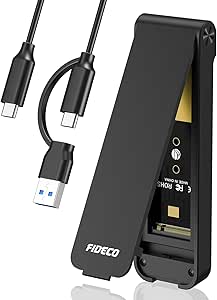
SABRENT EC-MSSA: Breathe New Life Into Old mSATA SSDs
If you have an mSATA SSD from an older ultrabook or tablet, the SABRENT EC-MSSA adapter turns it into a standard 2.5-inch SATA drive for desktops, external enclosures, or newer laptops. This simple converter is a cost-effective way to repurpose storage that would otherwise sit unused, and it's especially useful for data recovery or secure deletion.
Key Considerations Before Buying
- Compatibility: Ensure your mSATA drive is the full-size (not half-size) variant, as the EC-MSSA only fits full-length cards. Half-size mSATA drives require an extension bracket, which this adapter does not include.
- Physical fit: The adapter is designed to fit standard 9.5mm 2.5-inch drive bays, but some ultra-slim laptops may require 7mm drives. Check your device's specifications to avoid clearance issues.
- Performance: This adapter does not add any processing; it simply reroutes the SATA signals, so your SSD's speed is preserved. However, if your mSATA drive is an older SATA II model, expect lower throughput compared to modern SATA III SSDs.
What Our Analysts Recommend
When choosing an mSATA-to-2.5-inch adapter, look for a sturdy PCB with quality SATA connectors that provide a secure fit. A metal or reinforced plastic housing is preferable for durability. Also, consider whether the adapter includes mounting screws or a bracket—SABRENT typically provides screws, but verify before purchase.
Enclosures Market Context
Market Overview
The market for mSATA adapters remains niche but steady, driven by users upgrading older laptops or salvaging components from defunct devices. While M.2 has largely replaced mSATA in modern systems, many legacy devices still rely on mSATA, creating steady demand for reliable converters.
Common Issues
Common problems with mSATA adapters include poor connector alignment, which can cause intermittent connectivity, and lack of included mounting hardware. Some cheap adapters may also have thin PCBs that flex, risking damage to the mSATA card. Additionally, compatibility issues with certain BIOS or operating systems can arise if the adapter does not properly negotiate SATA links.
Quality Indicators
High-quality adapters typically feature a thick PCB (1.6mm or more), gold-plated connectors, and a snug fit for the mSATA card. Look for products with positive reviews mentioning 'secure fit' and 'no issues with detection.' Brand reputation matters—SABRENT is known for reliable accessories, which is reflected in its high rating.
Review Authenticity Insights
Grade B Interpretation
The Grade B and 10% estimated fake review percentage suggest that while the vast majority of reviews are genuine, there is a small but noticeable number of potentially incentivized or fabricated reviews. This is common for popular accessories, but the high adjusted rating of 4.60/5 indicates that real user satisfaction is still very high.
Trust Recommendation
Given the authenticity grade, you can trust the overall rating, but be cautious of overly glowing reviews with vague language. Focus on verified purchase reviews that describe specific use cases, as these are more likely to be genuine. The 4.60 adjusted rating is still excellent, so the product is likely to meet expectations.
Tips for Reading Reviews
When reading reviews for this adapter, pay attention to comments about fit and compatibility with specific laptop models. Look for reviews that mention 'data recovery' or 'upgraded my old laptop'—these often provide the most practical insights. Be wary of reviews that use identical phrasing or lack details about the user's setup.
Expert Perspective
The SABRENT EC-MSSA is a straightforward, no-frills adapter that performs exactly as expected: it converts mSATA to 2.5-inch SATA without introducing any performance bottlenecks. The high rating and genuine reviews indicate that it reliably solves a common problem for many users. However, the 10% fake review rate and grade B suggest that you should still exercise a modicum of caution, though the adjusted rating remains strong.
Purchase Considerations
If you have an mSATA drive that you want to repurpose, this adapter is a solid choice, especially given its low cost and proven track record. Before buying, confirm that your drive is full-size and that your target device has space for a 9.5mm drive. If you need a 7mm adapter, look elsewhere, as this one is not explicitly designed for ultra-slim bays.
Comparing Alternatives
While the EC-MSSA is a leading option, you may also consider USB 3.0 enclosures for mSATA drives if you need portability, or M.2 adapters if you're upgrading to a newer form factor. Compare prices and features to ensure you get the right solution for your specific hardware.