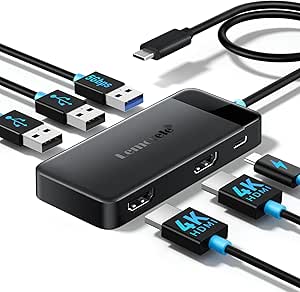
iPad Docking Stations: Why Port Variety and Video Specs Matter
The NEWQ 11-in-1 Docking Station Stand combines a tablet stand with a full port expander, adding 4K@120Hz HDMI, USB-C data and power passthrough, card readers, and more to an iPad. Before buying, understand how iPadOS handles external displays and peripherals, because not every port will behave the same on every iPad model.
Key Considerations Before Buying
- Confirm your iPad's port and chipset: the 4K@120Hz HDMI output requires a compatible USB-C iPad (typically M-series or newer iPad Pro/Air models), and older USB-C iPads may cap external display resolution or refresh rate.
- Check power passthrough wattage: the dock's USB-C PD input must supply enough power to charge your iPad while running HDMI, USB peripherals, and card readers simultaneously, so match it to your iPad's charging requirements.
- Plan your peripheral load: with 11 ports, simultaneous use of HDMI, USB-A devices, Ethernet, and SD cards can strain bandwidth and power, so prioritize the ports you actually need for your workflow.
What Our Analysts Recommend
Look for explicit HDMI version and refresh-rate support (HDMI 2.1 or equivalent for 4K@120Hz), clearly stated PD wattage, and a stand hinge rated for stable viewing angles. Build quality matters too: aluminum or reinforced ABS bodies and braided cables tend to hold up better in daily dock-and-undock use than all-plastic shells.
Docking Stations Market Context
Market Overview
The iPad docking station market has grown as iPads become laptop replacements, with brands like Anker, Satechi, and Hyper competing alongside newer entrants like NEWQ. Many products now combine a stand and hub, but video output capabilities vary widely, and true 4K@120Hz support is still a premium feature.
Common Issues
Buyers frequently report HDMI output limited to 30Hz or mirrored rather than extended display, insufficient power passthrough causing slow charging under load, and loose or fragile stand hinges. Compatibility confusion is also common, since iPadOS display support differs by model and generation.
Quality Indicators
Strong products publish detailed spec sheets (HDMI version, PD wattage, data speeds), list iPad model compatibility, and use metal-bodied connectors. Authentic reviews that name specific iPad models and describe real workflows (video editing, presentations, desk setups) are a better quality signal than generic praise.
Review Authenticity Insights
Grade A Interpretation
An A authenticity grade with an estimated 8% fake review rate is strong for this category, where accessory listings often attract incentivized reviews. The adjusted rating of 4.40/5 versus the displayed 4.56/5 suggests only a modest inflation, meaning the product's reputation is largely earned.
Trust Recommendation
You can treat the review base as broadly trustworthy, but still verify the specific claims that matter to you, such as 4K@120Hz performance and charging speed, by reading reviews that mention your exact iPad model. Filter for verified purchases and longer reviews with photos.
Tips for Reading Reviews
Focus on reviews that name their iPad model and describe port usage, since compatibility issues are model-specific. Pay attention to negative reviews about HDMI refresh rate or power delivery, as these reveal the most common real-world limitations of iPad docks.
Expert Perspective
The NEWQ 11-in-1 stands out in a crowded iPad dock market for advertising 4K@120Hz HDMI, a spec that few competitors at this price point match, and its 4.40/5 adjusted rating across 551 reviews indicates solid satisfaction. The combined stand-and-hub design suits desk setups where the iPad doubles as a second screen. However, the 4K@120Hz claim is only meaningful if your iPad model supports it, so check compatibility before buying.
Purchase Considerations
Weigh your iPad model and display needs first: if you have an M-series iPad and a high-refresh monitor, the 120Hz HDMI is a genuine differentiator. If you mainly need USB ports and charging, a simpler hub may suffice. Also consider desk space and whether you want the stand permanently occupied by the dock.
Comparing Alternatives
Compare with established brands like Anker and Satechi, which offer similar hubs with well-documented compatibility, and check whether a dedicated stand plus separate hub better fits your setup.