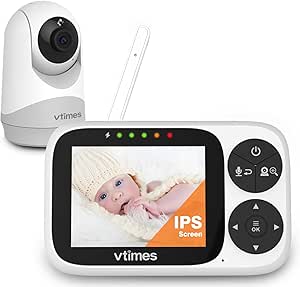
What to Know Before Buying a WiFi Baby Monitor with Dedicated Screen
This 1080P WiFi baby monitor pairs a 4-inch IPS parent unit with remote app viewing, so you get both a dedicated handheld display and smartphone access. That dual-monitor approach is increasingly common in Canada, but the quality of each viewing method—and how they work together—matters more than the spec sheet suggests.
Key Considerations Before Buying
- Confirm whether the parent unit and app can stream simultaneously, since some WiFi monitors only allow one active viewer at a time. For a dual-mode model like this, simultaneous viewing is the main reason to pay more than a basic audio monitor.
- Check the app's latency and notification reliability on your home network. App-based viewing depends on your Wi-Fi upload stability, so reviewers in older Canadian homes with thick walls often report more lag than those near the router.
- Verify the 4-inch IPS screen's real-world usefulness—IPS offers wider viewing angles than TN panels, but check whether the display dims adequately for night use and whether the parent unit battery lasts through an overnight stretch.
What Our Analysts Recommend
Prioritize monitors with clearly stated encryption (WPA2 or better) for both the local and remote streams, since a WiFi-connected camera is only as secure as its app. Look for a parent unit with a physical battery rating of at least 8–10 hours and an app that supports multiple user accounts, which matters for two-parent households or caregivers.
Video Monitors Market Context
Market Overview
The baby video monitor market has shifted heavily toward WiFi and app-connected models, but dedicated-screen units remain popular with parents who want a always-on display without tying up a phone. Canadian buyers also weigh cross-border app support and warranty coverage, since many units ship from U.S. or overseas sellers.
Common Issues
Frequent complaints in this category include app disconnects after router changes, laggy remote viewing when away from home, and parent-unit batteries that degrade within a year. Security is another recurring concern—unsecured cameras have been a well-documented problem, so encryption and firmware updates are not optional features.
Quality Indicators
Strong monitors specify their video encryption standard, publish clear battery life figures, and offer firmware updates through the app. Responsive customer support and a warranty honored in Canada are practical signals that a brand stands behind its software, which is where most failures occur.
Review Authenticity Insights
Grade B Interpretation
A Grade B with an estimated 15% fake review rate is middling—most reviews look genuine, but roughly one in seven may be incentivized or inflated. The 4.78/5 Amazon rating dropping to an adjusted 4.40/5 suggests the real customer experience is still positive but less glowing than the headline score implies.
Trust Recommendation
Treat the 4.40 adjusted rating as the more honest figure and read the mid-range 3-star reviews first, since they tend to describe setup friction and app issues that five-star reviews gloss over. The 522-review sample is large enough that patterns in critical reviews are meaningful.
Tips for Reading Reviews
Look for reviews that mention specific details like router compatibility, night-vision clarity, or battery drain over weeks of use—these are harder to fake than generic praise. Be skeptical of clusters of short five-star reviews posted close together, and weight reviews that compare this unit to named competitors.
Expert Perspective
This monitor's core proposition—a 1080P camera with both a 4-inch IPS parent unit and app access—covers the two main use cases parents actually want: a bedside display for nighttime and phone access for checking in from work. The adjusted 4.40 rating indicates solid but not exceptional satisfaction, and the 15% estimated fake-review share means the true score is likely in the low-to-mid 4s. The main risks are software-related: app stability, latency, and long-term battery life on the parent unit.
Purchase Considerations
Weigh whether you need remote app viewing at all—if you only monitor from home, a non-WiFi monitor is simpler and more secure. If remote access matters, confirm the app's encryption and check whether the seller offers Canadian warranty support before buying.
Comparing Alternatives
Compare this against other dual-screen WiFi monitors in the same price band, paying particular attention to app ratings in the Apple and Google stores, which reveal software quality faster than product listings do.