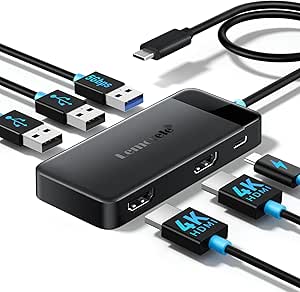
Triple 4K Docking: What to Know Before You Buy
The WAVLINK 13-in-1 USB-C Docking Station promises triple 4K display support for laptops, a rare feature at its price point. But not all USB-C ports are created equal—understanding your laptop's capabilities is key to avoiding disappointment.
Key Considerations Before Buying
- Check your laptop's USB-C port specifications: To achieve triple 4K, you'll need a laptop that supports DisplayPort Alt Mode and sufficient bandwidth (e.g., Thunderbolt 3/4 or USB4). Many standard USB-C ports only support dual displays or lower resolutions.
- Consider power delivery needs: This dock likely provides power to your laptop, but ensure it supplies enough wattage for your model—underpowered docks can cause slow charging or battery drain under load.
- Evaluate port layout and cable length: The 13-in-1 design includes multiple USB ports, Ethernet, and audio, but check if the arrangement suits your desk setup and whether the included cable is long enough for flexible placement.
What Our Analysts Recommend
Look for explicit confirmation of triple 4K support at 60Hz (not 30Hz) and compatibility with your laptop's GPU. Quality indicators include detailed specs on power delivery, build materials (metal vs. plastic), and clear documentation of supported display configurations.
Docking Stations Market Context
Market Overview
The USB-C docking station market is booming as laptops slim down, but quality varies widely. Brands like WAVLINK compete with established players like CalDigit and Plugable, often undercutting on price but sometimes sacrificing reliability or support.
Common Issues
Common complaints include insufficient power delivery, display flickering or dropouts, and overheating under heavy load. Many docks also fail to deliver advertised triple 4K due to bandwidth limitations or incompatible laptop ports.
Quality Indicators
Higher-quality docks use metal housings for heat dissipation, include robust power supplies, and provide clear compatibility lists. Look for reviews that mention long-term reliability and customer support responsiveness.
Review Authenticity Insights
Grade A Interpretation
An authenticity grade of A with an estimated 8% fake reviews indicates that the majority of reviews are genuine, giving you confidence in the overall rating. The adjusted rating of 4.40/5 (down from 4.56) suggests a slight inflation but still reflects strong satisfaction.
Trust Recommendation
You can trust the general sentiment, but focus on reviews from verified purchasers who describe specific use cases (e.g., triple monitor setups, power delivery). Be wary of overly enthusiastic reviews that lack detail.
Tips for Reading Reviews
Pay attention to reviews mentioning laptop models and display configurations—these are most helpful. Look for patterns in negative reviews about compatibility or power issues, as these may indicate common pitfalls.
Expert Perspective
The WAVLINK 13-in-1 docking station offers impressive specs for the price, with triple 4K support that's uncommon in budget docks. However, its performance hinges on your laptop's USB-C capabilities, and some users may encounter bandwidth limitations. The high authenticity of reviews suggests reliable feedback, but the adjusted rating hints at minor quality control issues.
Purchase Considerations
Weigh the value of triple 4K against potential compatibility headaches—if you have a Thunderbolt 3/4 laptop, this dock could be a steal. Otherwise, consider a dual-display dock or one with confirmed compatibility. Also, check the warranty and support options, as docking stations are prone to occasional failures.
Comparing Alternatives
Compare with docks from CalDigit, Plugable, or Kensington that may offer better build quality or support, albeit at higher prices. Read our other reviews for alternatives that match your specific needs.