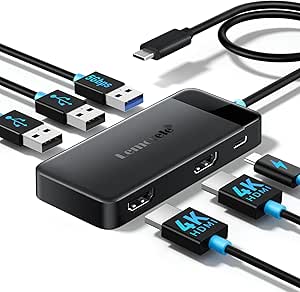
13-in-1 USB-C Docking Station: What to Know Before You Buy
A 13-in-1 USB-C dock like the MOKiN model promises to turn a single laptop port into a full desktop setup, but the smart display and charging passthrough add complexity. This guide covers what matters for this specific product and similar high-port-count docks.
Key Considerations Before Buying
- Port mix and power delivery: With 13 ports, you'll want to confirm the dock supports the charging wattage your laptop needs (often 85W–100W passthrough) and that the HDMI/DisplayPort outputs match your monitor resolutions and refresh rates.
- Smart display usefulness: The built-in display can show power, temperature, or connection status, but check whether it's genuinely informative or just a gimmick—and whether it stays readable at a glance.
- Laptop compatibility and driver requirements: Some docks require DisplayLink drivers for multi-monitor setups on certain laptops, so verify your OS and laptop model are supported, especially if you use macOS or a locked-down work machine.
What Our Analysts Recommend
Look for explicit power delivery specs (e.g., 'up to 100W charging') and video output details (e.g., '4K@60Hz') rather than vague marketing. Build quality matters too: metal housings and braided cables tend to last longer, and a clear warranty or support policy is a good sign.
Docking Stations Market Context
Market Overview
USB-C docking stations have proliferated as laptops shed ports, with brands like MOKiN, Anker, and CalDigit competing on port count, price, and features like smart displays. The market ranges from budget 5-in-1 hubs to premium Thunderbolt docks, so it's easy to overpay for ports you won't use.
Common Issues
Common complaints include insufficient charging power (leading to slow laptop charging), display flickering or resolution limits, and overheating during heavy use. Some docks also suffer from loose connections or fail to wake monitors reliably after sleep.
Quality Indicators
Quality docks specify exact power delivery and video capabilities, use certified chipsets (e.g., DisplayLink, Thunderbolt), and have robust customer support. Reviews that mention long-term reliability and consistent performance across different laptops are strong signals.
Review Authenticity Insights
Grade B Interpretation
A Grade B authenticity rating with an estimated 10% fake reviews means most reviews are genuine, but a small portion may be incentivized or exaggerated. The adjusted rating of 4.00/5 (vs. 4.22/5) suggests genuine buyers are slightly less enthusiastic than the raw score implies.
Trust Recommendation
Trust the product's core functionality but verify specific claims—like charging wattage or display output—against the product specs and professional reviews. Pay attention to reviews that mention long-term use or specific laptop models, as these are harder to fake.
Tips for Reading Reviews
Focus on reviews with detailed pros and cons, especially those that mention particular ports or use cases (e.g., 'dual 4K monitors with a MacBook Air'). Be skeptical of short, generic praise and check whether negative reviews describe consistent issues like overheating or port failure.
Expert Perspective
The MOKiN 13-in-1 dock offers a lot of connectivity for the price, and its smart display is a novel touch, but the adjusted rating of 4.00/5 indicates some buyers encounter limitations. It's likely a solid choice for users who need many ports and don't require Thunderbolt-level performance, but those with high-power laptops or demanding display setups should scrutinize the specs.
Purchase Considerations
Weigh the dock's charging wattage against your laptop's requirements—if it can't deliver enough power, you'll need a separate charger. Also consider whether you need the smart display or would prefer a simpler, more reliable dock from a established brand.
Comparing Alternatives
Compare with similarly priced docks from brands like Anker or Plugable, which may offer better support or more proven reliability, especially if you need guaranteed compatibility with specific laptops.