
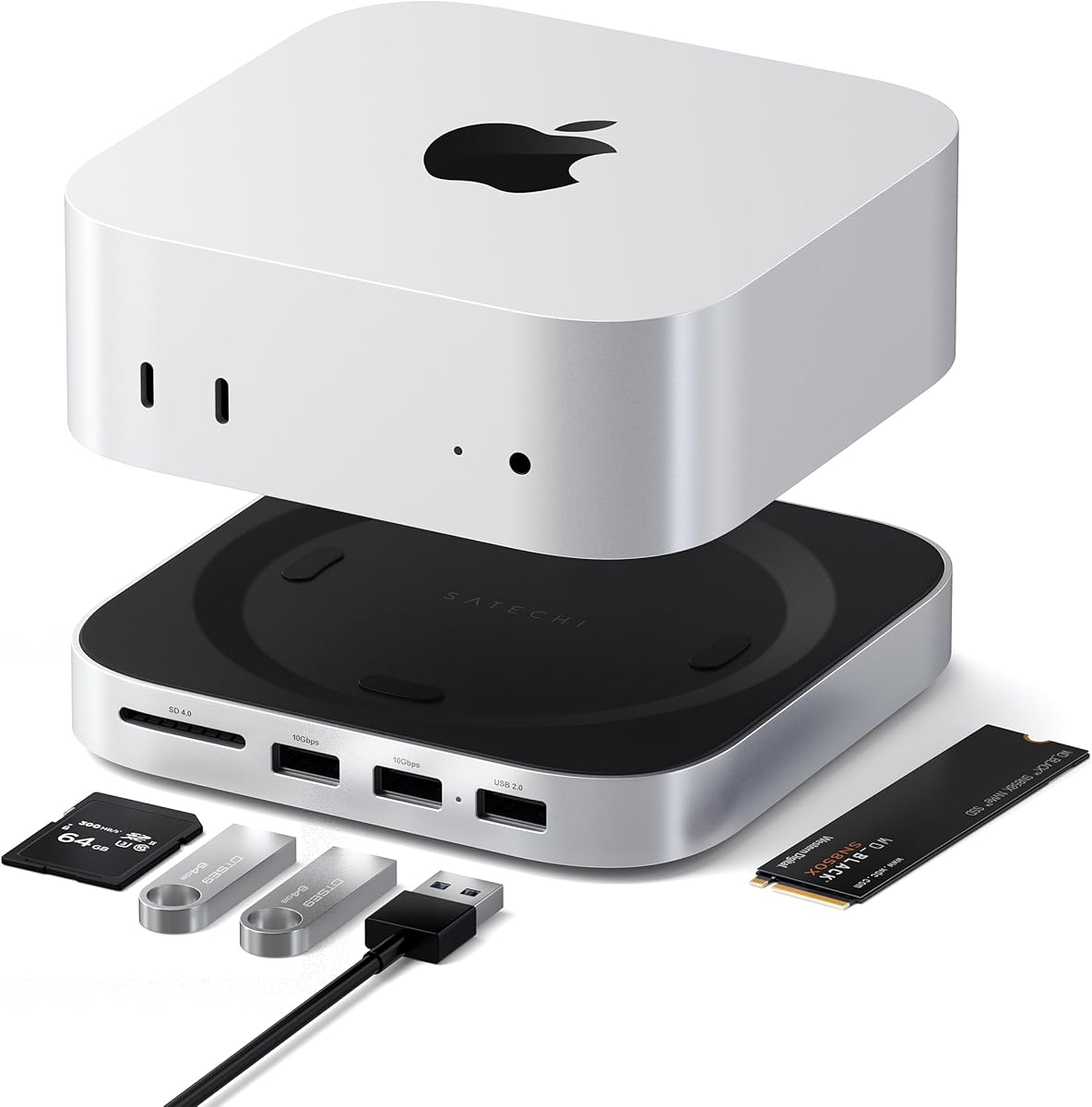
Maximize Your Mac mini M4: Hub, Stand, and NVMe SSD Enclosure
When you invest in a Mac mini M4, you're getting a compact powerhouse, but its limited ports can quickly become a bottleneck. A dedicated hub like the Satechi Mac mini M4 Hub & Stand not only adds essential connectivity but also elevates your setup with a built-in NVMe SSD enclosure for rapid storage expansion. Before you buy, it's crucial to understand what features truly matter for your workflow.
Key Considerations Before Buying
- Port selection and speed: Look for USB-A ports that support up to 10Gbps for fast file transfers, and ensure there's a dedicated data port for peripherals like keyboards or mice. The Satechi hub offers two high-speed USB-A ports plus a separate data port, which is ideal for avoiding bandwidth conflicts.
- Integrated storage expansion: An NVMe SSD enclosure built into the hub is a game-changer for running Time Machine backups or storing large media files. Confirm the enclosure supports standard NVMe drives and consider the thermal design, as sustained writes can generate heat that affects performance.
- Form factor and stability: A hub that doubles as a stand should match the Mac mini's footprint and provide a secure, ventilated base. The Satechi model is designed to nest neatly under the Mac mini M4, preserving its sleek aesthetic while improving airflow.
What Our Analysts Recommend
Quality hubs in this category use aluminum construction for heat dissipation and a snug fit. Check for USB 3.2 Gen 2 support (10Gbps) on all data ports, and ensure the SD card reader is UHS-II compatible for fast photo transfers. A well-reviewed product will have verified purchase badges and detailed user stories about real-world usage, not just generic praise.
Docking Stations Market Context
Market Overview
The docking station market for Apple Silicon Macs has exploded, with users seeking to overcome the limited port selection on the Mac mini M4. Products now commonly integrate NVMe SSD enclosures, high-speed USB-A ports, and card readers, but quality varies widely in terms of data transfer reliability and build materials.
Common Issues
Many hubs suffer from overheating during sustained file transfers, especially when an NVMe drive is under load. Others have flimsy connections that cause intermittent disconnects, or they block access to adjacent ports on the Mac mini. Poorly shielded designs can also introduce Wi-Fi or Bluetooth interference.
Quality Indicators
A premium hub will have a solid metal chassis, positive reviews mentioning specific use cases like video editing or backups, and a low percentage of suspicious reviews (like the 10% estimated for this product). Look for detailed feedback on transfer speeds and compatibility with various NVMe drives.
Review Authenticity Insights
Grade B Interpretation
With a Review Authenticity Grade of B and an estimated 10% fake review rate, this Satechi hub has a strong but not perfect review profile. The majority of reviews are genuine, backed by verified purchases and detailed usage contexts like Time Machine backups, which adds credibility to the overall 4.67-star rating.
Trust Recommendation
You can trust the positive consensus, but be aware that a small fraction of reviews may be inflated. Focus on the 90% of authentic reviews that describe real-world performance, such as how the hub handles sustained writes or whether the SD card reader meets speed expectations.
Tips for Reading Reviews
When reading reviews for docking stations, prioritize those that mention specific hardware configurations (e.g., which NVMe drive they used) and long-term reliability. Skip reviews that are overly brief or lack technical details, as these are more likely to be from incentivized or fake accounts.
Expert Perspective
The Satechi Mac mini M4 Hub & Stand is a well-engineered accessory that addresses the Mac mini's port limitations while adding valuable storage expansion. Its 4.40 adjusted rating (excluding suspicious reviews) reflects genuine user satisfaction, particularly for tasks like Time Machine backups and media workflows. The integrated NVMe enclosure is a standout feature, but the 10% fake review rate suggests some marketing noise that slightly inflates the raw score.
Purchase Considerations
Weigh the convenience of an all-in-one hub against potential heat buildup during heavy use—ensure your NVMe drive is efficient and your workspace is ventilated. If you need multiple high-speed data ports or a Thunderbolt connection, this hub's USB-A focus may require additional adapters.
Comparing Alternatives
Shoppers should compare this with dedicated Thunderbolt docks for higher bandwidth needs, or simpler stands if they don't require NVMe expansion.


