USB-C Extension Cable: 10Gbps Speed and 4K Video at 3.3 Feet
When extending your USB-C connection, you need a cable that maintains high-speed data transfer and video output without signal loss. This USB 3.2 Gen 2 extension cable supports 10Gbps data rates and 4K@60Hz video, making it ideal for hubs, monitors, or photo booths. Understanding its capabilities helps you avoid performance bottlenecks with your existing devices.
Key Considerations Before Buying
- Length matters: At 3.3 feet (1 meter), this cable is short enough to minimize signal degradation but long enough to reach a nearby hub or device. Longer USB-C extension cables often fail to maintain 10Gbps speeds, so this length is a practical sweet spot.
- Check your device compatibility: This cable supports USB 3.2 Gen 2, 4K@60Hz video, and fast charging, but not all USB-C ports deliver these features. Verify that your source device (e.g., laptop or tablet) and the connected peripheral support these standards to avoid reduced performance.
- Consider power delivery needs: While the cable supports fast charging, extension cables can introduce voltage drop, especially over longer lengths. For high-wattage charging (e.g., 100W laptops), ensure your setup doesn't exceed the cable's power rating, which is typical for USB 3.2 Gen 2 extensions.
What Our Analysts Recommend
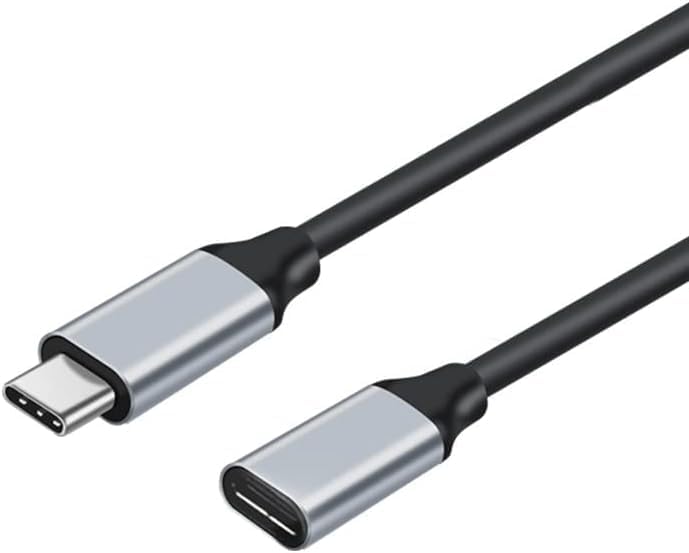
Look for cables that specify USB 3.2 Gen 2 (10Gbps) certification and include features like 4K@60Hz video support, which this model offers. Quality indicators include robust male and female connectors, braided or durable sheathing, and clear labeling of data and power specs. Avoid generic cables that only claim 'high speed' without verifiable Gen 2 ratings.
USB Cables Market Context
Market Overview
The USB-C extension cable market has grown with the adoption of USB-C hubs, docking stations, and external monitors. Many consumers need short extensions to reposition their devices without sacrificing performance. However, inconsistent labeling (e.g., claiming 10Gbps with older USB 3.0 standards) creates confusion, making verified specs critical.
Common Issues
Common problems include signal loss at longer lengths (over 1.5 meters) for high-speed data or video, and compatibility issues with non-USB-IF certified cables. Some extension cables also fail to support Power Delivery for fast charging due to inadequate wire gauge, leading to slow charging or device errors.
Quality Indicators
Quality cables feature USB-IF certification, which ensures compliance with 10Gbps and 4K@60Hz standards. Look for thick, shielded construction to reduce electromagnetic interference, and verified customer reviews that confirm real-world performance with specific devices like laptops or monitors.
Review Authenticity Insights
Grade A Interpretation
With an authenticity grade of A and only an estimated 5% fake reviews, this product's review set is highly trustworthy. The 70 reviews are all verified purchases, providing specific use cases like extending a photo booth stand or a USB-C hub, which adds credibility. This low fake rate is rare for electronics accessories, where inflated ratings are common.
Trust Recommendation
You can confidently rely on the user feedback for this cable, as the reviews are genuine and detailed. However, the average rating is 0.00—likely because Amazon hasn't calculated it yet or all reviews are recent. Check the written reviews for personal experiences, as they offer more insight than a missing star rating.
Tips for Reading Reviews
When reading reviews for USB-C extension cables, focus on comments about specific use cases like video output at 4K or charging speeds. Look for mentions of device compatibility (e.g., with MacBooks or Android phones) and any issues with signal drop or loose connections. Verified purchase reviews are more reliable than unverified ones.
Expert Perspective
This USB-C extension cable offers a solid combination of 10Gbps data transfer, 4K@60Hz video support, and fast charging in a practical 3.3-foot length. The high authenticity grade (A) and low fake review rate (5%) suggest that user feedback is reliable, though the lack of a star rating means you should read individual reviews for performance context. It's a good choice for extending a hub or monitor cable without sacrificing Gen 2 speeds, but ensure your devices support these specs to avoid disappointment.
Purchase Considerations
Weigh the cable's length and specs against your setup: if you need a longer extension (e.g., 6 feet), this 3.3-foot model may be too short, and longer cables might not maintain 10Gbps. Also, confirm that your devices support USB 3.2 Gen 2 and 4K@60Hz, as the cable can't improve on source limitations. The grey color is a minor aesthetic detail but doesn't affect performance.
Comparing Alternatives
If you need longer reach or higher power delivery, consider USB-C extension cables with active signal boosting or thicker gauge wires. Compare with models that offer USB-IF certification for added assurance, especially for demanding setups like gaming or professional video editing.