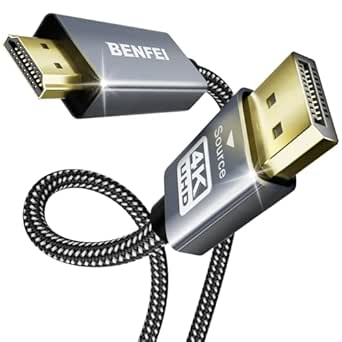
Choosing the Right DisplayPort 1.4 Cable for High-Refresh Gaming
When shopping for a DisplayPort 1.4 cable like the Maxonar 8K 10ft, it's crucial to understand the bandwidth requirements of your display and the cable's capabilities. This cable supports up to 8K@60Hz, 4K@144Hz, and 1080P@240Hz, making it suitable for high-performance gaming setups.
Key Considerations Before Buying
- Bandwidth and Resolution: Ensure the cable supports the necessary bandwidth (HBR3, 32.4Gbps) for your desired resolution and refresh rate, especially if you plan to use 4K at 144Hz or 8K at 60Hz.
- Length and Build Quality: A 10ft cable may experience signal degradation if not properly shielded. Look for cables with high-quality construction, such as gold-plated connectors and durable jackets, to maintain signal integrity over longer distances.
- Compatibility: Check that the cable is compatible with your devices, including support for HDCP 2.2 for protected content and features like DSC (Display Stream Compression) for high resolutions.
What Our Analysts Recommend
Look for VESA certification, which ensures the cable meets DisplayPort 1.4 standards. Additionally, read customer reviews about durability and performance with specific monitors, like the Odyssey G9, to confirm real-world reliability.
DisplayPort Cables Market Context
Market Overview
The DisplayPort cable market is flooded with options, but not all cables are created equal. Many cheap cables claim high specifications but fail to deliver the required bandwidth, leading to flickering or black screens. As monitors with higher resolutions and refresh rates become more common, the demand for certified DisplayPort 1.4 cables has increased.
Common Issues
Common problems include cables that don't support the advertised bandwidth, leading to signal dropouts or reduced refresh rates. Another issue is poor shielding causing electromagnetic interference, especially over longer lengths. Some cables also lack proper HDCP support, causing issues with streaming services.
Quality Indicators
Quality cables often have VESA certification, which tests for bandwidth and reliability. Look for reviews that mention specific high-bandwidth use cases, such as 4K@144Hz or 8K@60Hz. Build quality, including connector strain relief and cable thickness, also indicates durability.
Review Authenticity Insights
Grade A Interpretation
With an adjusted rating of 4.80/5 and a Grade A authenticity, the Maxonar cable's reviews are highly trustworthy. The estimated 5% fake review percentage is low, and the presence of reviews in multiple languages suggests genuine customer feedback from diverse regions.
Trust Recommendation
You can trust the overall rating, but always read recent reviews to check for consistency. Look for reviews that detail specific setups and performance, as these are more likely to be authentic and helpful.
Tips for Reading Reviews
Focus on reviews that mention your specific monitor or use case. Pay attention to comments about durability and customer service. Be wary of reviews that are overly vague or only mention shipping speed.
Expert Perspective
The Maxonar DisplayPort 1.4 cable appears to be a reliable choice for high-bandwidth applications, backed by a strong 4.89/5 rating from nearly 3,000 reviewers. Its support for 8K@60Hz and 4K@144Hz makes it future-proof for high-end gaming monitors. The 10ft length is convenient for larger setups, but users should ensure it doesn't exceed the length where signal degradation occurs without active amplification.
Purchase Considerations
Consider your specific needs: if you require a longer cable for a complex setup, you might need an active cable or a fiber optic option. Also, check if your devices support DisplayPort 1.4 to take full advantage of the bandwidth. Price is competitive, but ensure it fits your budget and quality expectations.
Comparing Alternatives
Compare with other VESA-certified cables from brands like Cable Matters or StarTech, especially if you need longer lengths or additional features like locking connectors.