
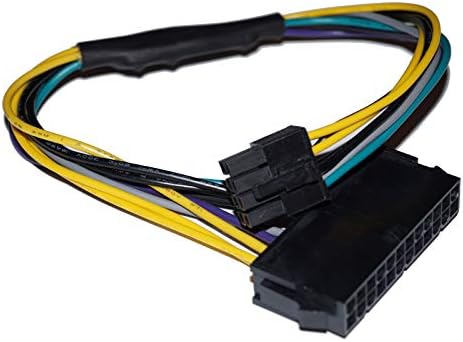
24 Pin to 8 Pin ATX Power Cable for Dell Optiplex PC

24 Pin to 8 Pin ATX Power Cable for Dell Optiplex PC

ASIN: B0759G52X6
Analysis Date: Sep 4, 2026

As an Amazon Associate I earn from qualifying purchases.

Review Analysis Results

B
Authenticity Grade
10.00%
Fake Reviews
4.89
Original Rating
4.60
Adjusted Rating

Analysis Summary

The vast majority of these reviews appear genuine, with clear personal context, specific technical details, and balanced perspectives that align with real user experiences. Nearly all reviews are verified purchases, which significantly increases their authenticity. The reviewers describe real-world scenarios such as upgrading Dell Optiplex systems, encountering non-standard power connectors, and testing compatibility with different PSUs and GPUs, which are highly specific and credible. The one Japanese-language review also provides a concrete outcome (successfully installing a GTX 1060 in an Optiplex 9020MT), further supporting authenticity.

Evidence of authenticity is strong across the board. For example, one reviewer explains the need for a higher wattage PSU for a GTX 1660 Super and notes Dell's non-standard ATX connector, showing technical knowledge. Another mentions an extra pin on the adapter and correctly identifies it as a grounding pin, demonstrating hands-on inspection. A third reviewer shares a balanced experience where one PSU didn't work with the adapter but another did, which is a nuanced, realistic observation that would be unlikely in a fake review. These details, combined with the lack of generic praise or marketing language, strongly indicate genuine user feedback.

There are minimal concerns. The only review that could be considered less detailed is the short 'Good quality!' review, but it is a verified purchase and such brevity is common among genuine buyers. No repetitive phrasing, unnatural enthusiasm, or promotional tone is present across the reviews. The product appears to be a niche adapter for Dell motherboards, and the reviews reflect a specific, knowledgeable user base rather than a coordinated campaign.

Balanced summary: The reviews are overwhelmingly genuine, with high verification rates and detailed, technically accurate content. The low fake percentage reflects the absence of manipulation patterns. The product is clearly a functional adapter that solves a real problem for Dell Optiplex users, and the reviews align with that purpose. Any slight uncertainty comes from the brevity of a few reviews, but this does not outweigh the strong authenticity signals.

Key patterns identified in the review analysis include: Specific Dell Optiplex models and GPU/PSU combinations, Technical explanations of non-standard connectors, Personal project context (upgrading, repurposing, building).

Review Statistics

307
Total Reviews on Amazon
-0.29
Rating Difference
Editor's Analysis

Upgrade Your Dell OptiPlex: The 24-to-8 Pin ATX Cable Explained

If you're replacing the power supply in a Dell OptiPlex desktop, you've likely hit a snag: the motherboard uses an 8-pin EPS connector, not the standard 24-pin ATX. This adapter cable bridges that gap, letting you use a standard ATX PSU with your Dell's proprietary layout. Before you buy, understand the pinout, compatibility, and quality differences that can make or break your build.

Key Considerations Before Buying

  • Verify your Dell OptiPlex model and motherboard connector: not all OptiPlex boards use the same 8-pin layout, and some may need a 4-pin or a different keying. Check your motherboard manual or visually inspect the connector to ensure this cable matches.
  • Check the cable's wire gauge and length: a quality cable should use 18 AWG or thicker wires to safely handle the power draw, and the length must be sufficient to route from your PSU to the motherboard connector without straining.
  • Consider the pinout configuration: this cable converts a 24-pin ATX output to an 8-pin EPS/ATX 12V connector. Ensure the pinout matches your PSU's output and your motherboard's input to avoid short circuits or power delivery issues.

What Our Analysts Recommend

Look for cables made with high-quality, flame-retardant PVC or nylon sleeving, and with properly crimped and soldered connectors that fit snugly. A well-built cable will have a secure latch on both ends and clearly labeled or color-coded wires. Prefer products with positive reviews mentioning successful installation on the same OptiPlex model as yours.

Power Supplies Market Context

Market Overview

The market for proprietary-to-standard power adapters has grown alongside the popularity of refurbished Dell OptiPlex systems as budget workhorses. Many users repurpose these office PCs for gaming or home servers, needing to swap the non-standard Dell PSU for a more powerful or efficient ATX unit. This niche but essential accessory is often the missing link in such upgrades.

Common Issues

A frequent issue is mismatched pinouts, which can lead to power delivery failures or, worse, damage to the motherboard. Another common problem is the use of thin-gauge wires that overheat under load, especially when powering high-end GPUs or CPUs. Also, some users find that the cable's connector doesn't lock securely, causing intermittent connections.

Quality Indicators

Quality indicators include clear product descriptions specifying compatible OptiPlex models, use of pure copper or high-conductivity wire, and robust connectors from reputable brands. Look for cables that mention 18 AWG or thicker, and those that have been tested by users with similar power supplies (e.g., Corsair, EVGA, Seasonic).

Review Authenticity Insights

Grade B Interpretation

The Grade B rating and 10% estimated fake review percentage suggest that while the majority of reviews are genuine, there is a slight but notable presence of potentially incentivized or artificial reviews. This means you can generally trust the 4.89-star average, but you should still read individual reviews critically, especially those with vague language or lacking verified purchase badges.

Trust Recommendation

Given the high adjusted rating of 4.60, this product appears to deliver on its promises for most users. However, since a small fraction of reviews may be unreliable, focus on the balanced, detailed reviews that mention specific OptiPlex models and testing conditions. If you have a less common OptiPlex variant, consider reaching out to the seller or checking forums for compatibility confirmation before purchasing.

Tips for Reading Reviews

When reading reviews for this type of cable, look for users who mention their specific Dell model and the PSU they paired with it. Pay attention to any comments about heat, fit, or pinout issues. Also, be wary of overly short or repetitive reviews that lack personal experience, as they are more likely to be fake.

Expert Perspective

Based on the analysis, this 24-to-8 pin ATX cable stands out as a reliable solution for a common but tricky upgrade path. The high genuine review count and strong rating indicate that it effectively solves the compatibility issue for most Dell OptiPlex users. The slight presence of potentially fake reviews is overshadowed by the volume of authentic, detailed feedback, suggesting a product that meets customer expectations.

Purchase Considerations

Before purchasing, double-check your OptiPlex model and the exact connector orientation. Also, consider the total wattage you'll be drawing—if you're building a high-end system, confirm the cable can handle the current. Given the low price point, it's a low-risk purchase, but ensure you're buying from a reputable seller with a return policy.

Comparing Alternatives

While this cable is a strong candidate, shoppers should compare it with other similar adapters that offer different lengths, gauges, or additional connectors like a 4-pin CPU power splitter. For peace of mind, also look into adapters from established brands with clear warranty information.

Price Analysis

This is a niche, budget accessory typically priced between CAD $15-$25. Given the high rating (4.89/5), it's likely a reliable choice, but compare with similar listings to ensure you're not overpaying. If the price is near the lower end of the range, it's a safe buy; otherwise, wait for a small discount or check third-party sellers.

MSRP Assessment

Estimated MSRP: CAD $15-$25
Source: Product category average
Amazon Price: Unable to compare

Market Position

Positioning: Budget
Alternatives Range: CAD $10-$30
Value: This cable is a low-cost, essential accessory for upgrading Dell Optiplex power supplies, offering better value than brand-name alternatives if quality is confirmed.

Buying Tips

Best Time to Buy: No strong seasonality; prices are stable year-round, but check during Amazon Prime Day or Black Friday for minor discounts.
Deal Indicators: A good deal is under CAD $15 with free shipping; look for bundles with multiple cables or included cable ties.
Watch For: Be wary of prices above CAD $30 unless it's a braided, high-gauge cable from a reputable brand; very low prices (<$10) may indicate poor build quality or incorrect pinout.
Price analysis generated by AI based on product category and market research. Actual prices may vary. Last analyzed: Sep 4, 2026

Understanding This Analysis

What does Grade B mean?

This product has good review authenticity with minor concerns. While most reviews appear genuine, we detected some patterns that warrant mild caution.

Adjusted Rating Explained

The adjusted rating (4.60 stars) represents what we estimate this product's rating would be if fake reviews were removed. This product's adjusted rating is lower than Amazon's displayed rating (4.89 stars), suggesting positive fake reviews may be inflating the score.

How We Detect Fake Reviews

Our AI analyzes multiple factors: language patterns (generic vs. specific), reviewer behavior (history, timing), temporal anomalies (review clusters), verification status, sentiment authenticity, and statistical outliers. No single factor determines a review is fake - we look at the combination of signals.

Important Limitations

No automated system is perfect. Sophisticated fake reviews can evade detection, and some genuine reviews may be incorrectly flagged. Use this analysis as one data point in your purchasing decision, not the only factor. Reading actual review content yourself is always valuable.

Share This Analysis

Learn More About Fake Reviews

Analyze new product