
Choosing a Steam Deck dock requires balancing port selection, power delivery, and SSD expansion
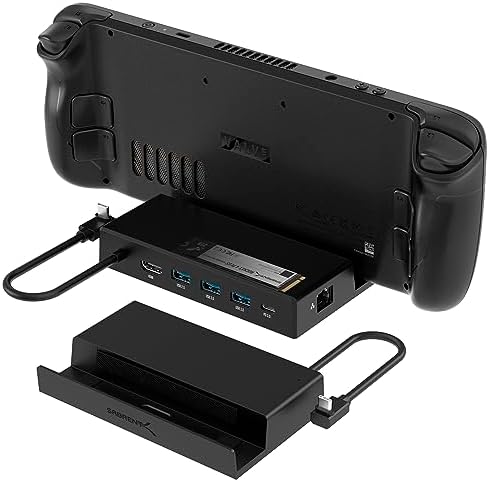
For Steam Deck owners, a dedicated dock transforms the handheld into a desktop gaming station. The Sabrent 7-in-1 model stands out with its integrated M.2 SSD slot, a feature that directly addresses the Deck's limited internal storage. Buyers should evaluate docks based on their specific connectivity needs, power pass-through capability, and whether they value the convenience of on-dock storage expansion.
Key Considerations Before Buying
- Power Delivery (PD): Ensure the dock's USB-C charging port supports at least 45W PD to charge the Steam Deck while under load; the Sabrent's 90W port provides ample headroom for the Deck and connected peripherals.
- Video Output: The HDMI 2.0 port supporting 4K@60Hz is essential for connecting to modern monitors or TVs without compromising frame rates in desktop mode or during gameplay.
- Expansion Strategy: Decide if you prefer internal storage upgrades via the dock's M.2 slot (like this Sabrent) or external storage via USB ports; the former offers a cleaner setup but locks the drive to the dock.
What Our Analysts Recommend
Quality docks for the Steam Deck will explicitly list compatibility and stable firmware. Look for robust construction around the USB-C connector, as this is a common stress point. Genuine reviews often mention reliable wake-from-sleep functionality and stable Ethernet performance, which are critical for a seamless desktop experience.
Docking Stations Market Context
Market Overview
The Steam Deck docking station market has matured beyond Valve's official dock, with third-party manufacturers like Sabrent offering feature-rich alternatives, often at competitive prices. These products compete on port selection, build quality, and unique features like integrated SSD expansion.
Common Issues
Common problems include docks that fail to consistently output video after the Deck wakes from sleep, USB-C connectors that feel loose or insecure, and power delivery circuits that can't sustain the Deck's charge during intensive gaming sessions. Some docks also lack proper ventilation, causing heat buildup for both the dock and the SSD.
Quality Indicators
High-quality docks use premium materials for the USB-C connector and housing, have clear firmware update paths, and provide stable power delivery data. Look for brands that specify chipset details (e.g., Realtek for Ethernet) and adhere to USB and HDMI standards, as this correlates with better compatibility and fewer firmware quirks.
Review Authenticity Insights
Grade B Interpretation
A Grade 'B' with an estimated 10% fake review rate suggests a generally trustworthy review pool with minor anomalies. For a product with over 4,300 reviews and a 4.8 adjusted rating, this indicates strong authentic satisfaction, though a small portion of reviews may be overly promotional.
Trust Recommendation
Given the high number of verified purchases ('V'), you can place significant trust in the consensus. Focus on reviews that detail specific use cases, like the M.2 SSD installation process or performance with 4K monitors, as these are harder to fabricate and provide practical insights.
Tips for Reading Reviews
Prioritize reviews that mention long-term use (e.g., 'after 3 months') and discuss the dock's performance with various Steam Deck firmware updates. Be slightly more skeptical of reviews that only praise generic aspects like 'fast shipping' without detailing the product's technical performance.
Expert Perspective
The Sabrent 7-in-1 dock presents a compelling, feature-dense proposition for Steam Deck owners. Its standout feature—the integrated M.2 SSD slot—is a legitimate differentiator that solves a key Deck limitation. The exceptional adjusted rating of 4.8/5 from thousands of verified buyers strongly indicates it delivers on its core promises of reliable connectivity, stable 4K output, and solid power delivery. The high 90W power input provides future-proofing for peripherals.
Purchase Considerations
This dock is particularly valuable for users who want a permanent desktop setup with expanded storage without opening their Deck. Weigh the convenience of the built-in SSD slot against the need to potentially purchase a separate NVMe drive. Ensure your monitor supports HDMI 2.0 to fully utilize the 4K@60Hz capability.
Comparing Alternatives
Shoppers should compare this model's unique SSD expansion against docks offering more USB ports or dedicated audio outputs, depending on their peripheral needs.


